
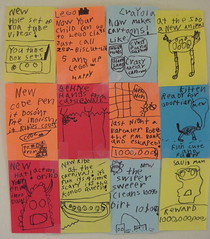
 Miles (7) has started his own newspaper, The Patrick’s Army Chronicle. Well, “started” may be too strong a word. He created issue #1 sometime between 5:45 and 6:45 one morning, before we got up. Nice ratio of copy to ads. And just in time to beat the SF Chronicle’s move to full-color printing by one day! Way better photos, too. A bit of concern on this end re: his interest in advertising, but with conversation keeping undue influence at bay, it’s all good. Gotta admire his industriousness. My fave: “New code pen. It doesn’t rite Inglish, it rite’s codes!” Though the sheer terror of “Beehive hangs from catsle wall” is nothing to sneeze at. Also includes a one million dollar reward for the unconditional capture of Squid Man.
django-treedata: DataSF Contest Winner
 Recently I was invited to participate in the California Data Camp and DataSF App Contest hosted by California Watch and spot.us. The unconference would feature lots of discussion about making use of publicly available data sets to improve quality of life. The App Contest challenged developers to choose one of the many data sets available at DataSF.org and build something cool with it in a relatively short period of time.
Long story short — my contest entry, which explores San Francisco’s database of publicly maintained trees and plants, won the competition! Full details, and downloadable source code, available at my Scripts and Utilities site.
Thanks so much to David Cohn of Spot.us and all of the conference organizers and supporters. Thanks also to J-School webmaster for Chuck Harris for his contributions to the project. It was a great day, and winning the competition was a total surprise. Now I just need a city to take the source code and run with it.
spot.us has covered the event live throughout the day.
Huffington Post mentioned django-treedata in Sophisticated Tree Hugging: the Pure Joy of Public Data
Birdhouse 960
 Blog look different? At first glance, not by much, but I’ve just completed a massive cleanup of the back-end, replacing the old HTML/CSS with the 960 Grid System, starting with the 960bc (blank canvas) WordPress theme. While I was at it, took the opportunity to search/replace out a bunch of old non-semantic code buried in the posts, updated or replaced a lot of plugins, and killed off a few old features that had out-lived their usefulness.
The biggest news: After years of preaching the HTML validation gospel to students, I still hadn’t gotten around to trying to make my own platform validate… but the Foobar Blog finally does! Well, almost. There will always be 3rd party code outside your control that can’t be hammered into shape. The biggest offenders here are embedded Flickr slideshows and WordPress’ own embedded Gallery feature. Ugh. But aside from that, we’re pretty darn close to clean. Everything I can control validates at least.
The old design had accreted slowly over the years, from a patchwork of parts built and gathered. Original intention was to go for a clean break and adopt a modern 3rd-party theme, but the more I searched, the more I felt like I loved the “Cheap Thrills” design that’s evolved here (not available for download, sorry). So I decided to port Cheap Thrills to 960. It wasn’t all roses, since the divs in this theme hug each other so tightly, while 960 assumes margins everywhere. A lot of fiddling with negative margins, and I haven’t solved the equal height divs problem quite yet. Will do soon.
New in this pimplementation:
- Much wider content area. Goal is to be able to show full-width video and slideshows, plus code samples that don’t fold to the next line or stretch out of the content space.
- Syntax highlighting for code samples (example)
- Tag cloud (see sidebar) – I’ve been tagging random articles for a long time but didn’t want to display a cloud until there were enough of them to warrant it. Still haven’t gone through and tagged the entire site history, but the cloud is picking up steam.
- General cleanup. Cruft removal. So. Much. Cruft.
- Somewhat wider sidebar – more room for Image from Nowhere and Recent Comments. Some of the old Images from Nowhere look a bit stretched but future ones will be generated larger.
- Replaced my old handmade RSS-based Twitter integration with Twitter for WordPress. Super clean – much better for DIY theme builders than the usual TwitterTools.
- The old Democracy plugin for polling appears to have been abandoned. Replaced it with the much cleaner WP-Polls, which also meant manually copying all of the old Poll data into the new system (ugh!). See the Pollster section.
- Replaced the old contact form in the shacker contacter with the much simpler Contact Form 7.
- Nips and tucks galore.
Process took way longer than expected of course – everything does – but these things had been gnawing away at me for a long time now. Feels great to have it all done. Haven’t done any cross-browser testing yet – let me know if something doesn’t look right for you.
Can’t say enough good things about 960 Grid. We’ve standardized on it at work, and it really does make life easier. Not without its warts, but much more pleasant than the YUI grid it replaces.
Sow, grow, harvest, cook
I’m very taken by the mission statement of the East Bay School for Boys:
By the time he graduates, each boy will:
Examine and acknowledge his own learning strengths and weaknesses and set personal learning goals; collaborate in a community-oriented, project-based internship experience; conduct a conversation in a foreign language about something that he reads in that language; disassemble, diagram, rebuild, and write instructions for something electrical or mechanical; write a cogent persuasive piece on a matter of personal importance; analyze a meaningful passage of another’s writing and declaim it with passion and from memory; sow, grow, harvest, cook and eat his own vegetable; solve a challenging problem in a team; take a leadership role in a project, event or activity of significance; By performing the appropriate research, determine whether a statement by a public official is true; assess media coverage of an issue or event from various perspectives; hold and care for a newborn baby; demonstrate by something measurable a commitment to creating a more sustainable future; conduct a scientific experiment, collect and record empirical data, and produce a written summary of the results with sound scientific conclusions; participate in a physical team competition; mentor another boy in something in which he feels confident; and produce or perform a work of art.
Imagine what the world would look like if every boy and girl in the United States (or world?) could graduate saying he could do all of these things. How would things be different than they are today?
Seven Television Commercials
Recently at Stuck Between Stations:
Scot sat down with his better half to watch Radiohead: Seven Television Commercials, a brief collection of Radiohead music videos.
Such impressionistic stuff, we decided to skip any attempt at actual review/synopsis and instead just riff words off the visuals and post whatever came out, do a sort of Kerouac typewriter roll on it. What follows are seven songs, seven paragraphs.
Roger, Discovering Japan
I recently stumbled upon Neojaponisme’s summary of the hundred greatest Japanese rock albums, as compiled by Kawasaki Daisuke two years ago. While I’m generally no fan of numerical rankings for music, I’m struck by his explanation of why such lists have often been uncommon in Japan: he claims that almost entire music industry there “is infected with the idea that they should not rank releases because it would ‘make the record companies angry’.â€
Waste Stats
Some really amazing figures on solid waste, via the Clean Air Council, including:
Only about one-tenth of all solid garbage in the United States gets recycled.
In the U.S., 4.39 pounds of trash per day and up to 56 tons of trash per year are created by the average person. [Since this is garbage night and this stat got me curious, I actually weighed our garbage tonight before taking it to the curb – a total of 2.5 lbs for a family of 3 – the rest was recycled or composted.]
Diapers: An average child will use between 8,000 -10,000 disposable diapers ($2,000 worth) before being potty trained. Each year, parents and babysitters dispose of about 18 billion of these items. In the United States alone these single-use items consume nearly 100,000 tons of plastic and 800,000 tons of tree pulp. We will pay an average of $350 million annually to deal with their disposal and, to top it off, these diapers will still be in the landfill 300 years from now. Americans throw away 570 diapers per second. That’s 49 million diapers per day.
Throwing away one aluminum can wastes as much energy as if that can were 1/2 full of gasoline.
Americans receive almost 4 million tons of junk mail every year. Most of it winds up in landfills.
As of 1992, 14 billion pounds of trash were dumped into ocean annually around the world.
Forty-three thousand tons of food is thrown out in the United States each day.
Each American exerts three times as much pressure on the natural environment as the global average.
People who change their own oil improperly dump the equivalent of 16 Exxon Valdez spills into the nation’s sewers and landfills every year.
… more at the site.
Generating RSS Mashups from Django
I recently got to work on an interesting Django side project: the Bay News Network – a directory of Bay Area bloggers and hyperlocal news sites. The goal of the site was three-fold:
- To create a many-to-many directory of local sites that matched our editorial criteria
- To let site owners log in and edit their own listings
- To both consume and produce RSS feeds from the listed sites
The first two were pretty standard Django approaches – develop data models and editing interfaces using Django forms and re-usable apps like django-profiles and django-registration. The third goal turned out to be more interesting. We not only had to gather RSS feeds from more than 100 external sites several times per day, we needed to re-mix them (e.g. provide an integrated feed representing all blogs that cover Food, or all blogs that cover Oakland).
“Consuming” RSS feeds meant we needed to integrate feeds from the external sites into our own site. At the most basic level, this was pretty straightforward using Mark Pilgrim’s excellent Universal Feed Parser, which turns the real-world’s tag soup of disparate, incompatible RSS formats into a reliable data format you can step through in your code or templates. This worked well enough until I realized that grabbing and parsing external feeds in real-time was just not going to scale, performance-wise. Plus, we still had the RSS mashups to build, and would clearly need to be storing feed entries in our own database in order to sort them by category, etc.
Thus began the hunt for good feed aggregation systems for Django. Most roads pointed to django-planet, planet planet, and FeedJack, which are systems for gathering content from external sites and importing it into a single aggregated site. These were close to what I wanted, but weren’t great on the re-usability side. Since I already had existing models to define the sites, their owners, and their feeds, I didn’t want to rewrite all my models to work with another system’s conception of how things should be laid out. I also didn’t feel like plowing through their source code to chop out and rewrite just the bits I wanted. Eventually realized that I was looking for a few lines of code to work with my system, not a whole external system.
The surprising solution came from the Community section of the official Django project web site. The Django developers keep the code that drives djangoproject.com in subversion along with the source code to Django itself. And the code that drives that section of the site is really lightweight. So I did a subversion checkout of the Aggregator app, and found that all I really needed from it was its update_feeds.py script, which itself is a wrapper around Universal Feed Parser, tweaked to talk to my own models.
Two gotchas to be aware of:
- The app includes a bundled templatetags directory with a file called aggregator.py. But the name of the app itself is “aggregator.” I was getting strange import errors in various places before I discovered on the django-users mailing list that Django doesn’t like it when an app name matches a templatetag name. Easily fixed by renaming the templatetag.
- My first runs of
update_feeds.pywent fine, but later started erroring out with database integrity errors. The GUID field on the FeedItem model is set tounique=True, which prevents your database from storing any one FeedItem more than once. That’s great, but it was dishing up integrity errors for some reason. I fixed this by changing this line inupdate_feeds.py:
feed.feeditem_set.get(guid=guid)
to:
FeedItem.objects.get(guid=guid)
Once I was able to get the updater to run consistently without error, I needed to get it running via cron. The trick to running a Python script that talks to the Django ORM from a crontab is that you must supply the full Python paths in the environment to cron – it doesn’t pick them up automatically from the environment of the user that runs the cron job. This worked for me:
PYTHONPATH=/home/bnn/projects:/home/bnn/projects/bnn
DJANGO_SETTINGS_MODULE=bnn.settings
20 15 * * * python /home/bnn/projects/bnn/scripts/update_feeds.py 2>&1
Producing Feeds
With the harvesting system up and running, and all content coming into the datbase associated with blogs that were in turn categorized by “beat” and geographical area, outputting aggregated RSS feeds was a simple matter of using Django’s native syndication framework as documented. This went into urls.py:
feeds = {
    'all': AllFeeds,
    'cat': CategoryFeeds,
    'area': BeatFeeds,
}

# Feeds
url(r'^feeds/(?P.*)/$', 'django.contrib.syndication.views.feed', {'feed_dict': feeds}),
… and I created a file feedgenerator.py to contain the three corresponding classes and their querysets, using Holovaty’s sample code from chicagocrime.org as a starting point.
Cognitive Surplus
There’s an expression I hear a bit too often, in reference to other people’s chosen pastimes. It’s usually used in a negative sense, and more often than not, the pastimes being referred to are things like blogging, or Twittering.
“People have too much time on their hands” … or …Â “Where do people find the time?”
Clay Shirky had a similar conversation recently, regarding the thousands of people who spend their free time culling, cultivating, editing, and massaging the vast fount of human knowledge that is Wikipedia.
“Where do people find the time?” A fair question, until you look at it in comparison to the amount of time people spend watching television. As it turns out, Wikipedia represents, collectively, about 100 million hours of thought. Meanwhile, watching television consumes around two hundred billion hours, in the U.S. alone, every year.
So how big is that surplus? So if you take Wikipedia as a kind of unit, all of Wikipedia, the whole project–every page, every edit, every talk page, every line of code, in every language that Wikipedia exists in–that represents something like the cumulation of 100 million hours of human thought. I worked this out with Martin Wattenberg at IBM; it’s a back-of-the-envelope calculation, but it’s the right order of magnitude, about 100 million hours of thought. And television watching? Two hundred billion hours, in the U.S. alone, every year. Put another way, now that we have a unit, that’s 2,000 Wikipedia projects a year spent watching television. Or put still another way, in the U.S., we spend 100 million hours every weekend, just watching the ads. This is a pretty big surplus. People asking, “Where do they find the time?” when they’re looking at things like Wikipedia don’t understand how tiny that entire project is.
Shirky is talking about this in terms of “cognitive surplus” — all the brain power that’s sitting idle in a consumptive state, rather than a productive state. That’s not quite fair – we all need to consume information if we’re going to produce information. And oh yeah – we all owe ourselves a bit of “veg time” every day. But before you ask the question “where do people find the time” in regards to any person’s pastime that doesn’t interest you personally, remember that the average American watches 8+ hours of TV per day.
That in itself is a stunning statistic, and I’m not sure how to digest it – if you subtract time for work, school, eating, etc. I can’t see how a person could even watch two hours per day (I’m guessing that a lot of people simply leave the TV on all the time), but still. That’s a whole lot of cognitive surplus.
Miles and Scot Build a Fort
Over the course of summer 2009, Miles and I spent almost every dry weekend working on a backyard fort project. Awesome father/son bonding experience. He got to learn lots about planning and working with tools, and I really enjoyed having something analog to work on for a change. Took pictures along the way, and finally got around to putting them together in an audio slideshow this week.
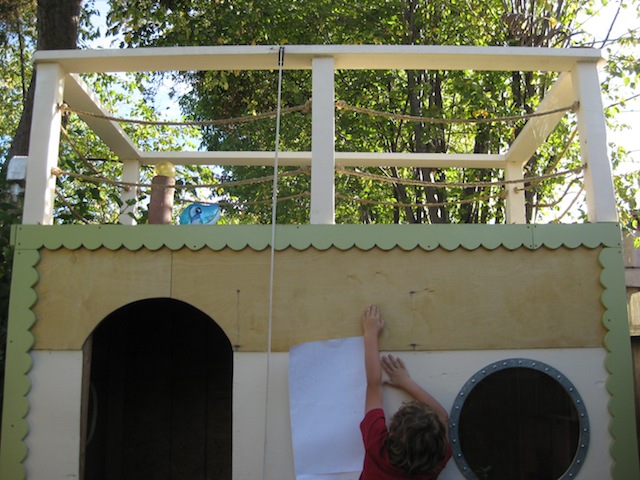
Law of the universe: All projects turn out to be more complicated than when first conceived, and this turned out to be true of both the fort build and of making the slideshow. So many fiddly details behind the scenes that are never apparent in the final product.
I actually recorded Miles talking about the build in two takes (with a professional Marantz audio recorder borrowed from the J-School), then edited them down in Garage Band. Did my best to match audio to the visuals, but in order to utilize all the best clips, there are a bunch of areas where you’ll find him talking about something out of order. No matter – it’s just for fun.
Audio slideshow (note: there’s a full-screen option in the slideshow viewer).
Geek Notes
The original plan was to do the slideshow by importing still images into Final Cut, where I could edit durations and audios all together. However, the discrepancy between still image/video aspect ratios and pixel shapes (square pixels for still images, rectangular pixels for video) kept resulting in weird output. Fiddled with it forever but just couldn’t get it right, so decided to do SoundSlides after all.
Neither SoundSlides nor iPhoto provide audio editing functionality, and I still needed a way to sync up the images with the audio where possible, so this is what I ended up doing:
- Arranged and edited images in iPhoto, exported to a temporary QuickTime slideshow.
- Also exported the images from iPhoto with filenames set to “sequence.”
- In Garage Band, imported both the temporary QuickTime and the .WAV files from the Marantz audio recorder. This gives you a timed thumbnail preview in GarageBand you can use to sequence your audio.
- Since I had two takes of the audio and wanted to select bits and pieces from both, created a third “temp” track I could use as a holding bin for audio scraps I hadn’t decided what to do with. This seven minutes of audio is the result of two full evenings of audio editing!
- Set the “movie” track to “Hide” in Garage Band so I could export an MP3 of the finished audio.
- Imported the sequenced still images and the final MP3 into SoundSlides Plus to create the captions and final output.
Article Journal
Birdhouse Hosting is pleased to welcome Article Journal:
Article is an online journal based in the San Francisco Bay area that strives to provide a venue for heartfelt and engaging conversations about art. We believe in talking openly and assuredly about inspiration, imagination, magic, politics, ideologies, atrocities, spirituality and love. These are the elements that define what we make and how we see.