Tweetbot Bookmarklet for Chrome

Despite a few quibbles, I’ve pretty much fallen in love with the desktop Twitter client Tweetbot. But the one thing I really missed from the official Twitter for Mac client was a good browser bookmarklet for Chrome, so I could start a new tweet from the current web page’s URL and document title.

I did find one referenced in this review, but it was DoA in Chrome – does nothing when clicked. With a bit of monkeying around, I’ve modified it to get along with Chrome:

javascript:window.location='tweetbot:///post?text='+encodeURIComponent(document.title)+encodeURIComponent(' ')+encodeURIComponent(window.location.href)

To install: Copy the code above to your clipboard. Create a new bookmark (of any page) and edit its properties. Paste over the URL with the contents of your clipboard. Save, and Bob’s your uncle!

Full-Screen Album Art in iTunes

If there’s one thing that bums me out, it’s an MP3 without big beautiful cover art. Like all y’all old-school LP guys, having high-quality album cover art on full display is part of the listening experience.  I’ve just spent the past couple years digitizing my entire LP and CD collections, then tracking down the best-possible cover art for every single one of the 5,000+ albums I ended up with — even if it meant photographing or scanning covers by hand.

With all that work done, I wanted to find a good way to display cover art on the Mac as cleanly as possible, without the clutter of other app windows in the way, and ideally without turning to 3rd-party software.

At first, I thought CoverFlow would be the One True Way, but  in practice, CoverFlow can’t be trusted. I find it constantly gets stuck on a cover, and no amount of toggling the “Now Playing / Selected” widget or switching between List View and CoverFlow view will coax it out of its rut.

Here’s the recipe I came up with – let me know if you have a better one:

0) Make sure all of your music has the highest-quality album art possible :) CoverScout is an awesome tool if you want to automate/simplify the process somewhat.

1) Make sure the Now Playing / Selected preview window is showing by clicking the disclosure triangle at the bottom left.

2) Double-click on the album cover to open it in a new, detached window (never knew you could do that, amiright?)

3) Use Mission Control to move that window to a new desktop. If you’re not already using multiple desktops, just drag the detached cover art window to a blank space near the top of Mission Control.

4) Switch to the new desktop and maximize the Now Playing window.

Now, to see your full-screen album art quickly, just switch to the other desktop. There are several ways to do this quickly in OS X, but I prefer either the three-finger sideswipe (if you have a laptop or trackpad) or Ctrl+Arrow[Left/Right].

Yes, there’s a small bit of setup, but since Mountain Lion restores all windows to their previous state after a reboot, you never have to do it again.

BTW, the cover art display isn’t just pretty – it’s functional too. Hover over the art and a controller will appear, giving you full scrub / skip / pause control, and letting you see the name of the current track and album.

Bonus: Remote Control
The really bad-ass thing is that you don’t have to do this from the Mac where the iTunes library lives – if you have a media server Mac that’s separate from the one you do your work on, you can run it all on a  by remote control, via iTunes Home Sharing.  I do my work on a MacBook Pro from the living room, which talks to iTunes on a Mac Mini server in the office which houses the music collection. The MacBook’s instance of iTunes in turn sends its output via AirPlay to an AirPort Express connected to the stereo across the living room from me. It’s a big crazy triangle, but the experience is completely smooth and user friendly (much nicer than the old VNC solution I used to use). If you would prefer to use a VNC client, I can’t recommend Jolly’s highly enough – the elastic screen feature is trippy, but does an amazing job of compensating for the fact that you might be controlling a huge monitor from a small one.

Comparing Javascript frameworks

It’s almost bewildering to see how many different (contrasting) opinions there are out there. After reading the post, check out the comments.

There are disagreements on which approach is the most performant, on whether using a custom collection of libraries (more flexible but more work) or a more complete framework (less flexible but less work) makes mores sense. There is disagreement over whether a whole site should be a Single Page Application, or just a section of a site. In fact, there’s disagreement over what constitutes the difference between a “site” and an “application” to begin with. There’s disagreement on whether client-side or server-side DOM-building is faster.

But the thing that struck me the most was this: The article starts with the premise:

“It’s no longer good enough to build web apps around full page loads and then “progressively enhance” them to behave more dynamically.”

but as one commenter astutely points out:

“… unless you happen to be github or 37signals, in which case you can easily build apps and progressively enhance to be fast and responsive ….”

I’m personally in the latter camp – it may just be a matter of habit, but I see the most logic in building traditional server-side DOM and then using “sprinkle on top” JS to enhance functionality where needed. I know I’m part of a slowly shrinking group of developers who haven’t bought into the 100% Javascript thing, but the “server first” approach does seem (to me) to give the best combination of  ease of development, graceful degradation, SEO, and performance.

But I’m ready and willing to have my philosophy tweaked on this – all I need is an example of how JS-based DOM creation can be as fast, easy, and performant as it is in Django, while still giving easy access to deep data traversals, model methods, and permissions (without jumping through time-costing hoops).

Today I begin my exploration of Rails in ernest. It’s becoming apparent that Rails has evolved in this direction more quickly than Django by building REST directly into the framework (Django is more about extremely DRY data modeling and it’s awesome auto-generated internal API).

So much to think about, so much cool stuff to explore.

http://blog.stevensanderson.com/2012/08/01/rich-javascript-applications-the-seven-frameworks-throne-of-js-2012/

Google+: View post on Google+
Flying Minecraft Octopi

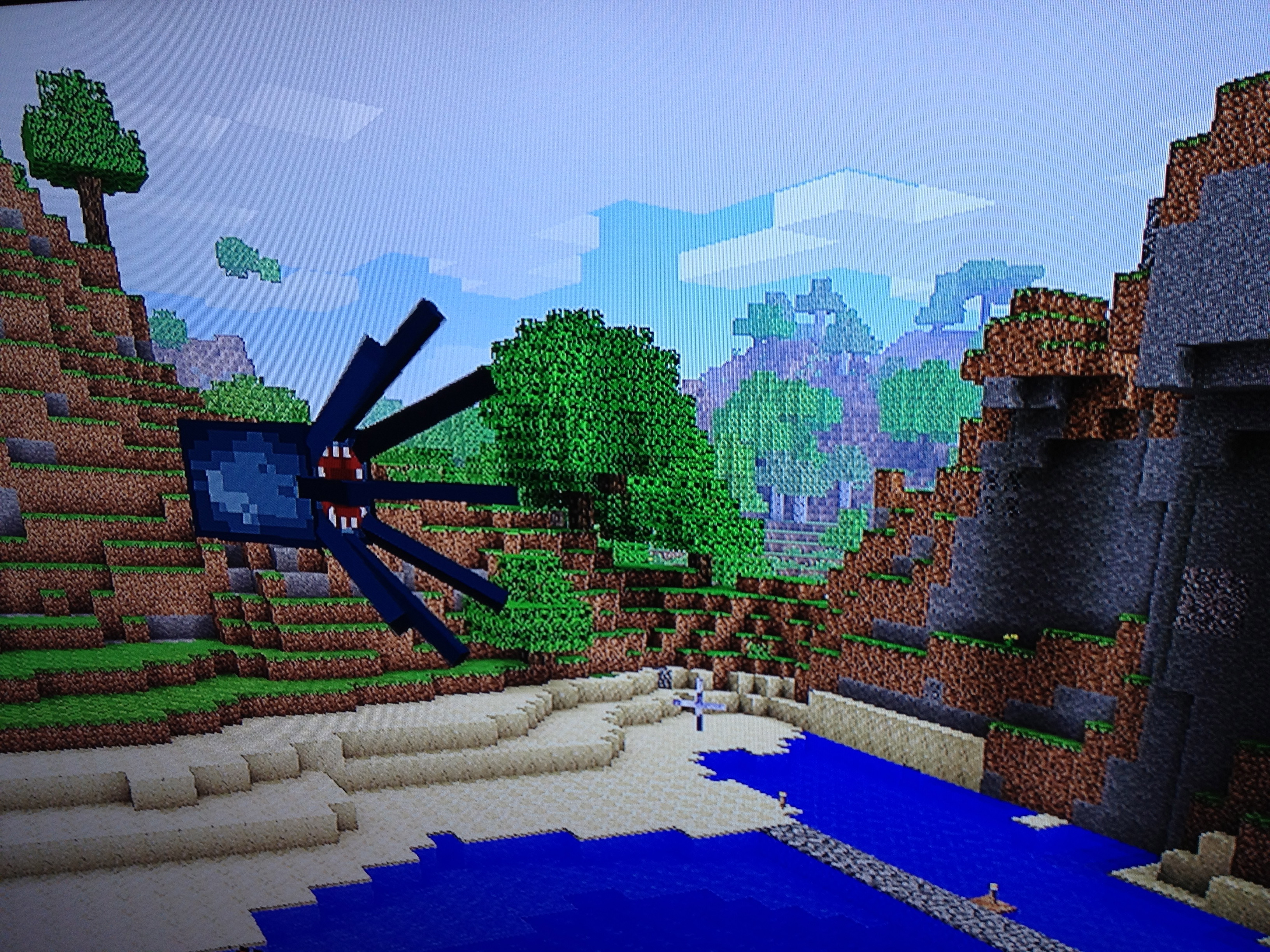
Is this a bug or a feature? Seems like every time an octopus gets cornered, it eventually finds its way out of water and into the air. Once airborne, you can give it a nudge and it will glide forever until it encounters an obstacle. We’ve tried, but it’s seemingly impossible to get it back into the water once it starts gliding. Not that I mind – they’re friggin’ awesome.

Bucketlist now has .5 million user-posted goals

Big landmark last night – Bucketlist crossed the .5 million user-posted goals threshold, and still going strong!

Thanks to our 26k users and all of the time they’ve put into posting their excellent lists. I love seeing users inspire and be inspired.

I’m proud of the site, but it really needs TLC and features development, while I have little free time to give it. Perhaps we’ll see some big changes this summer.

Embedded Link

Bucketlist » 10,000 things to do before you die

Log and catalog all the stuff you want to accomplish before you expire. Read stories and watch videos by people who checked items off their own bucketlists.


Maker Faire 2012

Hard to believe this was Maker Faire #7 already – the Bay Area’s great festival of DIY amazingness. And it was the 7th annual pilgrimage for my son and I – haven’t missed one yet! Honestly, I have to admit its specialness is diminishing with every passing year. When Maker Faire launched, it felt amazing to see that O’Reilly had tapped into this hidden wellspring of invention that had been bubbling just under the surface. Steampunk was new, Arduino was on the outskirts, and welding goggles were only owned by mechanics and obscure artists.

Ball Chain Curtain

Now, seven years later, there’s a feeling of sameness to Maker Faire, and as the festival gets more packed every year, it also becomes less dangerous, and the really exciting stuff becomes more scarce. Despite that, it’s still one of the most stimulating things you can possibly do with a kid in the Bay Area – an endless well of creativity and self-empowerment, and we’ll never stop going.

Blown away by this duct tape garden, consisting of more than 7,000 individual mini-sculptures:

Duct Tape Garden

Bummed not to see the giant Mousetrap at this year’s faire – its absence was like a big hole in the day. But Cyclecide continues to be one of our favorite parts of the day – dozens bikes hacked and chopped into every bizarre configuration imaginable, and entire carnival rides made of bike parts. Nothing at Maker Faire is more interactive, or more twisted. Also love the companion wooden bikes.

Whiskeydrome

See the Flickr set, or slideshow below

Lego T1 Camper Van

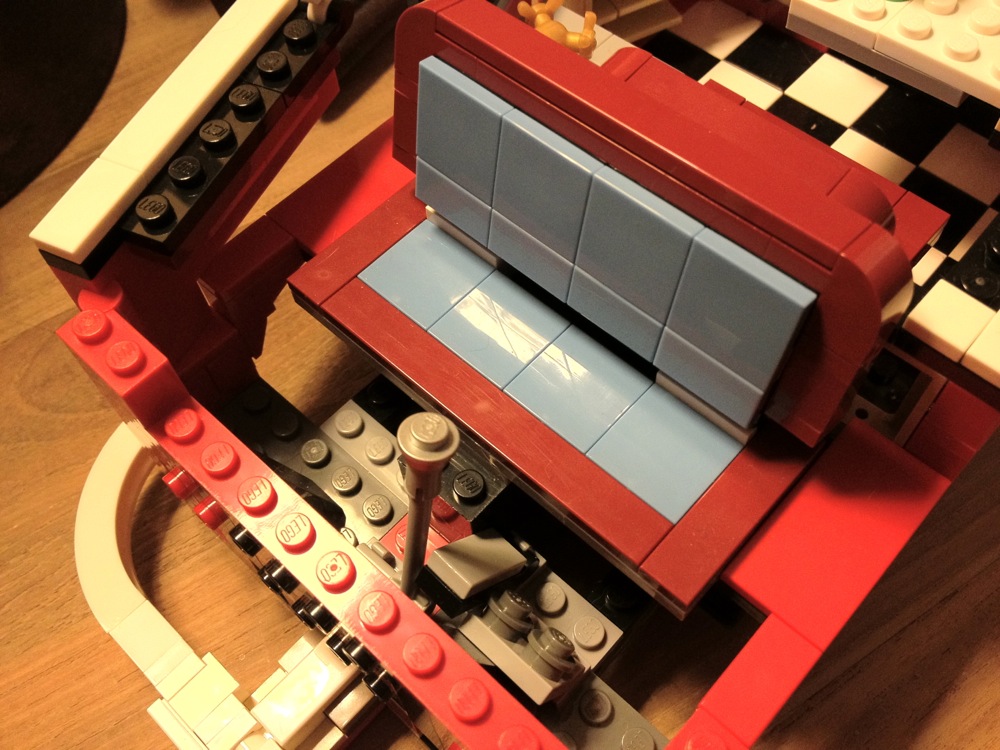
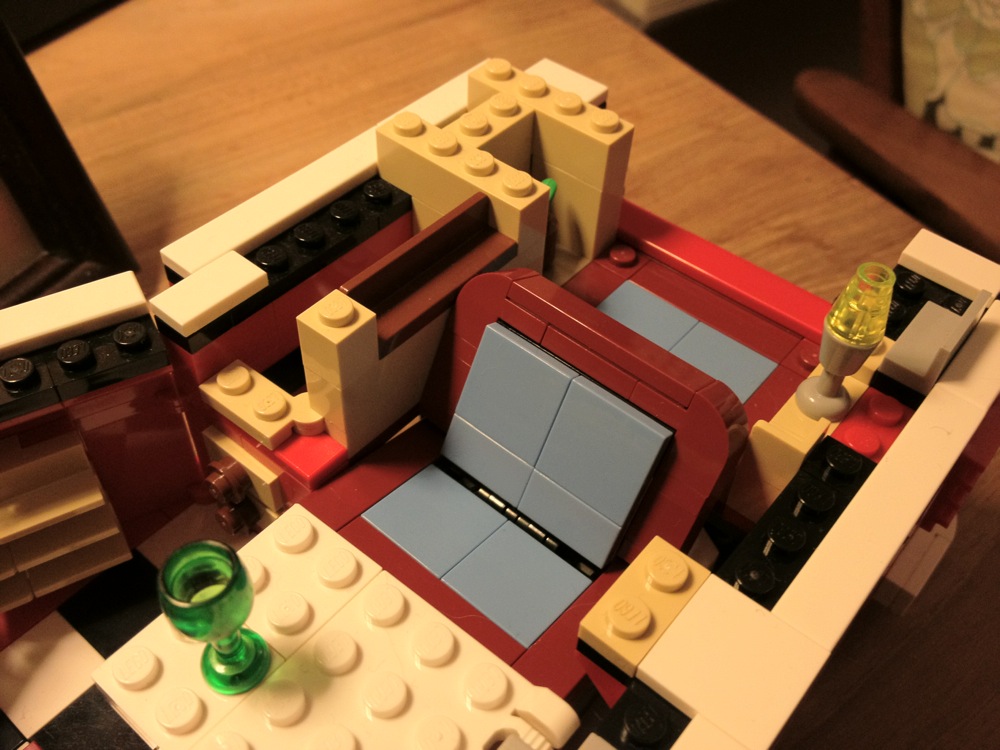
Most (OK, all) of the Lego models we’ve purchased over the past five years have been for my son, who carefully assembles them, keeps them pristine for about a day (max), and then disassembles them to be used as parts for his ongoing “Lego City” project, which rings his bedroom. It’s a noble effort, but as a former 1964 VW split-window bus owner, I couldn’t stand the thought of this one being taken apart. Some kind of mid-life crisis thing I guess, living out the past through my child’s eyes.

After some long delays as we raided his personal stash for missing bits, finally finished the build a few days ago. Amazing attention to detail in this model (1332 pieces), from the sink with comb and mirror to the surfing artwork on the interior, to the dashboard details, to the ridiculously accurate engine compartment and oil cooler, to the real fabric pop-top (which doesn’t really work that well, but hey, they tried).

Super-fun father/son build. Recommended.

Miles even narrated a little video tour for you:

http://youtu.be/KWef82dds7I

First thoughts on Node.js

This weekend I took out some time to explore Node.js, with the possible goal of using it to replace a Django project. I had a pretty mixed experience and am interested in feedback from people who have used both – opinions wanted.

To be upfront and fair, I’ve been using Django for years but have only put about five hours into investigating Node.js, so my impressions are completely lopsided. But here’s what it looks like to me:

– Asynchronous programming is going to take some getting used to. That’s OK.
– Node.js is really, really fast out of the box. But part of that is surely because it doesn’t include very much.

– Django is a complete, cohesive, end-to-end solution, where all the parts fit together seamlessly (“the Mac way”). Node.js is a baseline on top of which you pick your own framework, your own ORM, your own db driver, your own URL routing system, etc. etc. (“the Unix way”).

– There are advantages to the unix way, but IMO systems like that are more difficult to get off the ground and more difficult to maintain. The parts don’t necessarily talk to each other like you’d expect, and the whole project doesn’t get upgraded at once. End-to-end systems like the Mac ecosystem and Django are a huge win for productivity. For comparison, note the relative obscurity of TurboGears (a bunch of disconnected parts) compared to Django. Django ate TurboGears’ lunch because its cohesive and consistent. Productivity and reliability are the most important factors for me.

– The Node world is extremely fragmented right now, with dozens of Node libraries, solutions, and frameworks all competing for attention. But Express seems to be the most popular framework for Node right now, so I’m really comparing Express to Django (not just node.js to Django). And yet…

– Express doesn’t even include a way to connect to a database. You have to add that on.

– Express doesn’t include an ORM – you need to add that on. I looked into some Node ORMs, but they didn’t seem nearly as complete or sophisticated as Django’s.

– Express doesn’t provide the range of helpful command line tools, data API, etc. that Django provides.

– Express certainly doesn’t include anything like the Django admin.

– Purely my opinion, but Python just feels more elegant than Javascript. Code is more compact and more readable. Not a big hurdle though, just a preference.

And so on and so on. Django feels like “batteries included” – Node feels like a rummage sale.

Overall, it feels like Node/Express is really young. It’s exciting in ways, and shows huge promise, but how long will it take for it to feel competitive with mature frameworks?

Perhaps if I spent more time with it I’d feel less critical. Please let me know what I’m missing!

Google+: View post on Google+