Waffle Picker

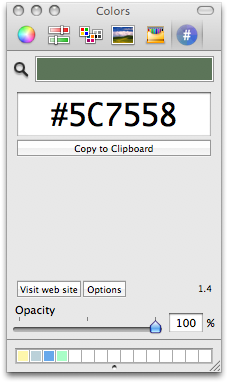
Wafflepicker I’ve been getting a lot of mileage out Pixelmator – lets me do pretty much everything I’d otherwise do in Photoshop, but with almost no launch time or bloat (the new background gradient on this site was created in Pixelmator). But one thing missing from Pixelmator that I need frequently is the ability to extract the hex value from colors for use in CSS.

Hopefully that ability will be added soon, but while looking around for a solution, came across Waffle’s Hex Color Picker. There are a ton of little hex utils for the Mac, of course, but what’s cool about this one is that it modifies the Mac’s native color picker, adding another pane to deliver the hex value for the current color. Install this little gem and you get hex values available from any Mac app that supports color choosing in any way. Muy elegante.

Cheap Thrills is Back

A student happened across this blog today, and nailed me on it.

“Didn’t you tell us that light text on dark backgrounds was fatiguing to read?”

“Do as I say, not as I do” doesn’t work on 20-somethings.

I knew when I tried that Darkwater thing that it was naughty. But something about the water compelled me. And now a combination of fatigue and public humiliation has compelled me back to Cheap Thrills, with a few mods, including a wider content area. And a rare foray into the red spectrum for the bg.

Feel like my old self again.

Music: Junior Kimbrough & Charlie Feathers :: I Feel Good Again

Tivo Transfers

Part of the fun of exploring the brave new world of HDTV and Series 3 TiVo is figuring out how to get Tivo-recorded shows onto the Mac and preserved on DVD, and to go the other way around, from the Mac to the TiVo (i.e. watching BitTorrent movies in the living room). None of this is built in, exactly, or well-documented. But it’s do-able.

For the First Case, I’ve used TiVo Desktop, which only comes bundled with Toast Titanium 8 (grrr — if you’re going to bundle a network connection on a device, then software to make it work should be included free), then burned to DVD with the awesome VisualHub.

I haven’t yet mastered the art of the Second Case, going from the Mac to the TiVo. Michael Alderete, who was a communications ace at Be back in the day, has written an excellent guide covering the process soup-to-nuts. We hooked up on the topic through a post in the VisualHub forums, and I wound up throwing in a few edits to his doc.

This document describes set-up and processes for downloading videos from the Internet using BitTorrent or other mechanisms, and then transferring them to a TiVo Series 3 high-definition (HD) recorder, for playback on a high-definition TV (HDTV).

Ironically, I haven’t yet gotten the Mac –> TiVo connection working yet myself; TiVo says my “brain” (that’s this Mac’s hostname) is empty. I suspect a firewall issue. Alderete’s directions assume Tiger, not Leopard. The problem is that in Leopard you need to manually poke a firewall hole for the apps you want to be able to communicate with the rest of the world — but Tivo Transfer is a preference pane, not an app, so there’s no clear way to add it (adding the preference pane module to the list of apps hasn’t unblocked the pipes).

Will get this licked eventually. And keep burning DVDs when necessary until then.

Music: Henry Kaiser :: It Happened One Night

Leopard Curiosities

Using Leopard for a couple of weeks now – a few more scattered impressions here. Haven’t had time to explore all the nooks and crannies. I spend 95% of my time in Mail.app, TextMate, and FireFox/Safari. Haven’t even launched Time Machine – need to clear a partition on the NAS, and even then, not sure TM is the way to go – we’re pretty happy with SuperDuper for backup, and its images are bootable/restorable, which is something I wouldn’t be eager to give up.

No accident that the Ars review spends the first few pages on UI annoyances. Nice finally to have the look and feel consistent across all apps, but the semi-transparent menu bar is a UI disaster if you use a background with mottled textures, like “stones.” Knew it wouldn’t be long before some kind of hack came out to restore the opacity. Leo ColorBar to the rescue – not only gets rid of transparency, but also lets you tint the menu any color, which I’m liking:

Leomenu

Ditto for the Dock: I never asked for a mirror. And replacing black “running app” triangles with little glow lights? Cute, but I was tired of them in a couple of days. All gratuitous eye candy. TigerDock lets you return the Dock to something closely resembling… the Tiger Dock. Dock Delight gets your triangles back.

The one thing I thought I missed the most from BeOS days was having multiple workspaces – I used to keep email and browser on one virtual desktop, photo and video apps in another, etc. Spaces was the single Leopard feature I was looking forward to the most. Somehow, in BeOS, the workspaces concept just worked. The first thing I noticed about Leopard’s Spaces was that, unlike in BeOS, there’s no way to assign different wallpaper or background colors to different desktops – they all look the same. Important visual cue, missing. And BeOS also let you run workspaces at different resolutions, which was a great way to test web designs. Not in Leopard.

But I soon realized that somehow, in the intervening years, the perceived need for multiple workspaces had gone away. Between Expose’, the Dock, Cmd-Tab, utils like QuickSilver, and showing/hiding apps, the Mac offers so many ways to switch apps effectively while keeping the desktop clean that the need was effectively gone. After using them for a few days, I realized that all Spaces was getting me was an additional animation when switching apps. I turned Spaces off.

Guess I’m giving the impression of not liking Leopard – but that’s not true. Just getting the annoyances out of the way. Lots to say (mostly good) about changes to Mail.app, iCal, and other features… will save those for another day.

Music: Trifactor :: Sequence Of Our Hearts

Data Detector

Datadetector

Diving into Leopard over the past few days… there’s so much to discover, lurking just below the surface. Kind of overwhelmed. After getting over initial dislike of the menu bar and Dock “improvements,” it’s going to take a while to digest all the hidden or semi-hidden functional changes. Some are obvious, others, not so much.

Tonight, came across an upcoming event in Mail.app, which I wanted to add to iCal. When I went to select the relevant words, a couple lines of plain text grew a magical “more” arrow, and offered to send the event straight to iCal for me. So slick and well thought-out. This is the kind of touch that made Apple Apple. Love it.

Lots more Leopard thoughts TK.

Music: Lafayette Afro Rock Band :: Voodounon

Fastest Windows Laptop

PC World tests Windows laptops for raw speed, and gives the nod to … Apple’s MacBook Pro.

The fastest Windows Vista notebook we’ve tested this year is a Mac. Try that again: The fastest Windows Vista notebook we’ve tested this year–or for that matter, ever–is a Mac. Not a Dell, not a Toshiba, not even an Alienware. The $2419 (plus the price of a copy of Windows Vista, of course) MacBook Pro’s PC WorldBench 6 Beta 2 score of 88 beats Gateway’s E-265M by a single point, but the MacBook’s score is far more impressive simply because Apple couldn’t care less whether you run Windows.

From the minute I first set up Windows under Parallels, I swore it was the fastest Windows I’d ever used — including boot time — so I’m not shocked by PC World’s finding. But it is just a wee bit ironic.

Music: Patti Smith :: Hey Joe

Comcast Gets Sneaky(er)

Interesting piece at Machinist on Comcast’s underhanded attempts to shape network traffic by blocking certain kinds of customer-generated traffic without their knowledge. Accessing a given, non-copyrighted resource such as the King James Bible via BitTorrent from a Comcast-connected computer may fail, while accessing the same file from a non-Comcast host may work fine. What’s going on? Comcast is apparently running bots on its network that masquerade as P2P client machines, which send false “hang up” messages to both ends of a P2P communication. In other words, Comcast is not treating all network traffic equally – they’re controlling and managing the activities of their users however they see fit – and they’re doing it without letting their users know. This sums up the paradoxical position that providers like Comcast are in:

Providers … have an incentive to reduce peer-to-peer traffic on their networks. But they can’t do so openly because, remember, a lot of people only pay for services like Comcast in order to use peer-to-peer programs.

If consumers ever needed a clear example of why we need net neutrality written into law, they need look no further. The free market isn’t going to shake this out – not when you’re dealing with things like cable companies and their virtual monopolies.

Music: Cibelle :: Train Station

Darkwater

Been itchy for some reason to totally scrap the WordPress theme I’ve been using and start from scratch. Tweaking occasionally on versions of the previous theme (which I called “Cheap Thrills” but have never released) for about five years, came across this Darkwater template a few weeks ago and it’s been pecking away at my subconscious since. Made a few tweaks last night and put it up. Just a few more kinks to work out. I’m also going to gradually start using the tagging features built into the WP 2.3 core.

Funny, I’ve been wanting to simplify simplify simplify. Darkwater actually is less complicated visually than Cheap Thrills was, but isn’t exactly the stark white thing I thought I wanted. Ever since reading Joseph Campbell back in college I’ve thought of watery scenes as metaphor for the unconscious. Which is maybe why I found this one irresistible – kind of a dreamtime descent.

Let me know what you think – be honest.

Music: Miriam Makeba :: L’Enfant Et La Gazelle

Pixelmator

Ugly truth: Photoshop takes so long to launch that I’ll sometimes defer doing small graphics jobs that need doing just to avoid sitting there staring at the splash screen. Funny how 60 seconds can seem like an eternity in the middle of a fast-paced work day. 90% of the time, 90% of people are doing everyday tasks that don’t require all of Photoshop’s functionality — and all of its bloat. The LE version is stripped down (don’t know what it’s launch times are like), but there’s an aching need out there for an elegant, fast, affordable but highly functional image editor for the Mac that basically works like Photoshop.

Pixelmator is exactly that. The UI is at once radically different and totally familiar. For me, there was no learning curve at all – just grab it and go. And the 3-second launch is barely noticeable. The one thing I use constantly in Photoshop that’s missing in Pixelmator is the Save for Web feature, which lets you compare multiple compression levels and their relative file sizes during the save operation. Other than that, I can see getting comfy with Pixelmator real quick.

Music: Daniel Johnston :: Some Things Last A Long Time
