The Compleat Guide to Digitizing Your LP Collection

For anyone over 40 (or maybe 30), having a music collection probably means that, in addition to racks of CDs and ridiculous piles of MP3s, you’re also sitting on bookshelves (or “borrowed” milk crates) full of vinyl LPs. Hundreds of pounds of space-consuming, damage-prone vinyl. LPs were music you could touch, with glorious full-color 12″ album art, meandering liner notes, and the practical involvement of lowering needle to plastic. Long-playing records represent an era when music was less disposable – we actually sat down to listen, rather than treating music as a backdrop to the rest of life. Dragging a rock through vinyl was not some kind of nostalgic love affair with the past – it was just the way things were. The cost of admission was pops and scratches, warped discs, having to get up in the middle of an album to flip the disc, cleaning the grooves from time to time, and getting hernias every time you moved to a new apartment.

We loved our vinyl despite and because of its warts, but we also didn’t hesitate to go digital when the time came – first with CDs, and then with MP3s and other file-based formats. We complained that CDs lacked the “warmth” of vinyl, but CD technology got better over time. We complained that the typical MP3 was encoded at bitrates too low to do justice to the music, but we learned to encode at higher resolutions, or to use uncompressed/lossless formats. Eventually, most of us gave in to temptation and started listening only (or mostly) to files stored on a computer somewhere in the house. Over time, many of us stopped listening to LPs altogether – but that doesn’t mean we got rid of them.

I personally held onto around 700 records made before the 90s, in addition to a few boxes of records my parents left in my care. Most of my CD purchases from the 90s and 00’s had been ripped long ago, but the LPs were locked in limbo – wasn’t listening to them, but couldn’t bear to let go, either. In 2011, I finally decided it was time to hunker down and digitize the stacks, to un-forget all those excellent records.

Digitizing LPs has almost nothing in common with ripping CDs. It’s a slow process, and a lot of work. But it can be incredibly rewarding, and going through the process puts you back in touch with music the way it used to be played (i.e. it’s a great nostalgia trip). In this guide, I’ll cover the process of prepping your gear, cleaning your records, and capturing as much of the essence of those old LPs as possible, so you can enjoy them in the context of your digital life.

Continue reading “The Compleat Guide to Digitizing Your LP Collection”

SoloMail, WordPress Mass Management

There are a number of plugins out there designed to scan a WordPress site on a periodic basis (e.g. nightly), grab all the recent posts, and tidy them up into an email digest. Heck, I even wrote one of my own a few years ago. Some work as WP plugins, others scrape RSS feeds.

But none of them let you hand-pick the posts you want to send by email, none of them let you “send now” and few of them provide good controls for managing the HTML/CSS of the email template. So I decided to write my own. SoloMail uses the excellent PHPMailer class, which is now included in WordPress core, and provides a simple checkbox on post views that lets you “Send now.” The current post is wrapped in a completely customizable HTML email template, and sent either to all registered users of the current site or to an external mailing list (preferred).

SoloMail is now available in the official WordPress plugin directory – get it here or see the post at Scot Hacker’s Scripts and Utilities.

To see it in action, subscribe to Birdhouse Updates.

Also: I’ve been hearing from developers who want to extend or improve the WordPress Mass Management Tools collection, so I’ve made it an open source project and posted it on github. Go for it.

Marshmallow Shooters

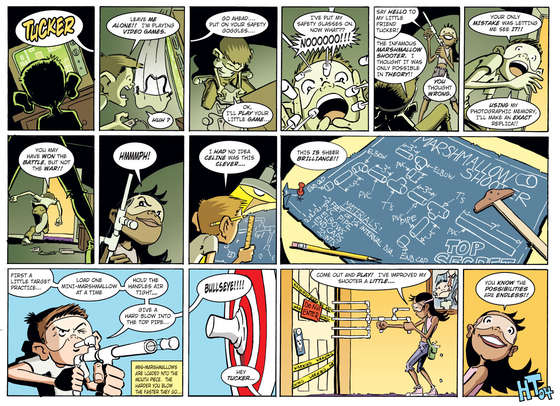
While researching ideas for the PVC pinecone catapult a while ago, Miles and I found these instructions for a blow-pipe Marshmallow Shooter. PVC is such a wonderful material to work with – cuts like butter, cheap as dirt, and all the elbows, caps, and T-joints you could possibly want are readily available at any hardware store. What’s not to love?


Full PDF

Today we decided to go for it. 10 feet of schedule 40 1/2″ PVC costs all of $2.50. With all the joints and fittings, total cost was a few bucks per “gun.” I put “gun” in quotes because this thing is just so darn playful, and I’m not sure it qualifies. It’s more of a “human breath marshmallow launcher.” And when the bullets are made of puffed sugar, it’s a stretch to call out the gun play metaphors.

Miles measured and marked out the segments after studying the comic above, I worked the chop-saw, and we assembled together. Total build time was less than 20 minutes. Mini-marshmallows fit cleanly into 1/2″ PVC (the snugger the better). We were completely amazed at how straight and clean these babies fly – we were able to launch them 25-30 feet and hit targets like the chimney on the roof, bus stop signs, or the sidewalk on the other side of the street with ease. They do sting slightly if you get hit at close range, but not at all through a light shirt or pants.


Miles finds his mark – Mommy gardening

They’re soft enough to be totally safe in the house, but don’t stomp ’em into the carpet or you’ll be sorry. Outside, they can probably be considered completely biodegradable.

Subscribing to TED Talks in HD with TiVo

When you burn out on the TV wasteland and want some actual brain food, podcast junkies will tell you that one of the most reliable sources of high-quality content is the seemingly bottomless series of TED Talks. Brilliant minds in every topic field, from recycling to neuroscience, reefs to religion, get 5-15 minutes to hold forth, bend your brain, and make you a better person. TED has expanded beyond its roots, and TED talks are now held all over the world at satellite conferences, meaning there’s an endless supply of great content. The site graciously provides the talks as archived video, always available.

TED’s not a cable channel, but its content is accessible via RSS. If you’re a TiVo user, you’ve got a two-part problem: 1) How to get something akin to a TED Talks “Season Pass,” so you always have access to recent stuff, and 2) How to get the talks in HD format, since standard-def internet content looks horrible on an HD TV.
Continue reading “Subscribing to TED Talks in HD with TiVo”

Python Gift Circle

Holiday Python geekiness…

If your family (or classroom or workplace) does “gift circles,” where everyone buys a gift for exactly one other person in the group, you could do (and probably already do do) the old “pull a name out of a hat” thing. But that takes setup time: writing down names, cutting them out, finding a hat, passing it around… shouldn’t this process be automated? Here’s a little Python script to get it done quick.

On my MacBook, the script runs for ten people in 27 milliseconds – think of all the egg nog you could drink in the time you save!

Populate the “recipients” list with real names and run ./gift-circle.py.

Update: This script is now available at github.

#!/usr/bin/python
import random

'''
Gift exchange randomizer in Python.
Step through a list of people and, for each member of that list,
select someone else to be a recipient of their gift. That recipient:

    A) Must not be themselves (no self-gifting)
    B) Must not already have been assigned as a recipient

Due to randomization, we can't prevent the possibility that 7/8 of people
will all give to each other, leaving the 8th to give to themselves. Therefore
we keep running the function until we get full distribution.
'''

def give():
    str = ''

    givers = ['Leslie', 'Jamie', 'Avis', 'Jim', 'Amy', 'Scot', 'Mike', 'Miles', 'Buford', 'Momo']
    recipients = list(givers)  # Make a copy

    for idx, giver in enumerate(givers):

        # Grab random person from the recipients
        recipient = random.choice(recipients)

        # Make sure we haven't either randomly chosen the same recipient and giver OR
        # ended up with only one un-gifted person in the list.
        if recipient == giver:
            return False
        else:
            # Remove this recipient from the pool and build the results string
            recipients.remove(recipient)
            str = str + "{idx}: {giver} gives to {recipient}\n".format(
                idx=idx+1, giver=giver, recipient=recipient
                )
    return str


# Keep trying until we get through the set with no failures
results=give()
while not results:
    results = give()

print results

Output looks like this:

1: Leslie gives to Amy
2: Jamie gives to Leslie
3: Avis gives to Momo
4: Jim gives to Jamie
5: Amy gives to Buford
6: Scot gives to Mike
7: Mike gives to Scot
8: Miles gives to Avis
9: Buford gives to Jim
10: Momo gives to Miles

Happy holidays, you big nerd!

Shorter URLs with Base62 in Django

Update, 4/2017: See this StackOverflow answer for a different (and probably shorter) approach to this problem.

URL shorteners have become a hot commodity in the age of Twitter, where every byte counts. Shorteners have their uses, but they can also be potentially dangerous, since they mask the true destination of a link from users until it’s too late (shorteners are a malware installer’s wet dream). In addition, they work almost as a second layer of DNS on top of the internet, and a fragile one at that – if a shortening company goes out of business, all the links they handle could potentially break.

On bucketlist.org, a Django site that lets users catalog life goals, I’ve been using numerical IDs in URLs. As the number of items stored started to rise, I watched my URLs getting longer. Thinking optimistically about a hypothetical future with tens of millions of records to serve, and inspired by the URL structure at the Django-powered photo-sharing site Instagr.am, decided to do some trimming now, while the site’s still young. Rather than rely on a shortening service, decided to switch to a native Base 62 URL schema, with goal page URIs consisting of characters from this set:

BASE62 = "abcdefghijklmnopqrstuvwxyz0123456789ABCDEFGHIJKLMNOPQRSTUVWXYZ"

rather than just the digits 0-9. The compression is significant. Car license plates use just seven characters and no lower-case letters (base 36), and are able to represent tens of millions of cars without exhausting the character space. With base 62, the namespace is far larger. Here are some sample encodings – watch as the number of characters saved increases as the length of the encoded number rises:

Numeric Base 62
1 b
22 w
333 fx
4444 bjG
55555 o2d
666666 cN0G
7777777 6Dwb
88888888 gaYdK
999999999 bfFTGp
1234567890 bv8h5u

I was able to find several Django-based URL shortening apps, but I didn’t want redirection – I wanted native Base62 URLs. Fortunately, it wasn’t hard to roll up a system from scratch. Started by finding a python function to do the basic encoding – this one did the trick. I saved that in a utils.py in my app’s directory.

Of course we need a new field to store the hashed strings in – I created a 5-character varchar called “urlhash” … but there’s a catch – we’ll come back to this.

The best place to call the function is from the Item model’s save() method. Any time an Item is saved, we grab the record ID, encode it, and store the return value in urlhash. By putting it on the save() method, we know we’ll never end up with an empty urlhash field if the item gets stored in an unpredictable way (site users can either create new items, or copy items from other people’s lists into their own, for example, and there may be other ways in the future — we don’t want to have to remember to call the baseconvert() function from everywhere when a single place will do — keep it DRY!)).

Generating hashes

So in models.py:

from bucket.utils import BASE10, BASE62, baseconvert

...

def save(self):

    # Do a bunch of stuff not relevant here...

    # Initial save so the record gets an ID returned from the db
    super(Item, self).save()

    if not self.urlhash:
        self.urlhash = baseconvert(str(self.id),BASE10,BASE62)
        self.save()     

Now create a new record in the usual way and verify that it always gets an accompanying urlhash stored. We also need to back-fill all the existing records. Easy enough via python manage.py shell:

from bucket.models import Item
from bucket.utils import BASE10, BASE62, baseconvert

items = Item.objects.all()
for i in items:
    print i.id
    i.urlhash = baseconvert(str(i.id),BASE10,BASE62)
    print i.urlhash
    print
    i.save()

Examine your database to make sure all fields have been populated.

About that MySQL snag

About that “snag” I mentioned earlier: The hashes will have been stored with mixed-case letters (and numbers), and they’re guaranteed to be unique if the IDs you generated them from were. But if you have two records in your table with urlhashes ‘U3b’ and ‘U3B’, and you do a Django query like :


urlhash = 'U3b'
item = Item.objects.get(urlhash__exact=urlhash)

Django complains that it finds two records rather than one. That’s because the default collation for MySQL tables is case-insensitive, even when specifying case-sensitive queries with Django! This issue is described in the Django documentation and there’s nothing Django can do about it – you need to change the collation of the urlhash column to utf8_bin. You can do this easily with a good database GUI, or with a query similar to this:

ALTER TABLE `db_name`.`db_table_name` CHANGE COLUMN `urlhash` `urlhash` VARCHAR(5) CHARACTER SET utf8 COLLATE utf8_bin NULL DEFAULT NULL COMMENT '' AFTER `id`;

or, if you’re creating the column fresh on an existing table:

ALTER TABLE `bucket_item` ADD `urlhash` VARCHAR( 5 ) CHARACTER SET utf8 COLLATE utf8_bin NOT NULL AFTER `id` , ADD INDEX ( `urlhash` )

Season to taste. It’s important to get that index in there for performance reasons, since this will be your primary lookup field from now on.

Tweak URL patterns and views

Since the goal is to keep URLs as short as possible, you have two options. You could put a one-character preface on the URL to prevent it from matching other word-like URL strings, like:

foo.org/i/B3j

but I wanted the shortest URLs possible, with no preface, just:

foo.org/B3j

Since I have lots of other word-like URLs, and can’t know in advance how many characters the url hashes will be, I simply moved the regex to the very last position in urls.py – this becomes the last pattern matched before handing over to 404.

url(r'^(?P<urlhash>\w+)/$', 'bucket.views.item_view', name="item_view"),

Unfortunately, I quickly discovered that this removed the site’s ability to use Flat Pages, which rely on the same fall-through mechanism, so I switched to the “/i/B3j” technique instead.

url(r'^i/(?P<urlhash>\w+)/$', 'bucket.views.item_view', name="item_view"),

Now we need to tweak the view that handles the item details a bit, to query for the urlhash rather than the record ID:


from django.shortcuts import get_object_or_404
...

def item_view(request,urlhash):        
    item = get_object_or_404(Item,urlhash=urlhash)
	...

It’s important to use get_object_or_404 here rather than objects.get(). That way we can still return 404 if someone types in a word-like URL string that the regex in urls.py can’t catch due to its open-endedness. Note also that we didn’t specify urlhash__exact=urlhash — case-sensitive lookups are the default in Django queries, and there’s no need to specify the default.

If you’ve been using something like {% url item_view item.id %} in your templates, you’ll obviously need to change all instances of that to {% url item_view item.urlhash %} (you may have to make similar changes in your view code if you’ve been using reverses with HttpResponseRedirect).

Handling the old URLs

Of course we still want to handle all of those old incoming links to the numeric URLs. We just need a variant of the original ID-matching pattern:

url(r'^(?P\d+)/$', 'bucket.views.item_view_redirect', name="item_view_numeric"),

which points to a simple view item_view_redirect that does the redirection:


def item_view_redirect(request,item_id):
    '''
    Handle old numeric URLs by redirecting to new hashed versions
    '''
    item = get_object_or_404(Item,id=item_id)
    return HttpResponseRedirect(reverse('item_view',args=[item.urlhash]))

Bingo – all newly created items get the new, permanently shortened URLs, and all old incoming links are handled transparently.


Encouraging users to add avatars to profiles

One of the things that has vexed me since launching bucketlist.org a few months ago is the fact that most users don’t enter any sort of profile information whatsoever – not even an icon/avatar to represent themselves. In fact, I did a quick query the other night and discovered that only 1/4 of users had set up an avatar. This realization was both surprising and disappointing to me — surprising because most users of other social networks (Twitter, Facebook, etc.) go to lengths to make sure their profile info is complete and up to date. People on Twitter know that most people won’t even bother following people who don’t have personal icons.

Why was bucketlist being viewed differently by its users? And what could I do to encourage users to add profile info, or at least images of themselves?

One problem, I realized, was that the default avatar I was using on the site to represent avatar-less users was too bland. It didn’t bother users to be represented like this:

Toyed briefly with the idea of replacing the generic icon with something ridiculous, to motivate people to change it as soon as possible. But I don’t want to annoy or embarrass users. Also contemplated using some kind of Ajax-y banner thing to gently remind users to set up an avatar. Then it hit me last night – I don’t have to show the same image to everyone – why not do it like this:

if showing a bucketlist or goal whose owning user has an avatar, show that
if showing someone else’s list or item with no avatar, show the usual generic avatar
if showing your own list or item and you dont have an avatar, show something else

This trick replies on a bit of psychology – since the user probably assumes that everyone sees their lists and items with same icon they’re currently seeing, there’s a strong incentive to change it. Here’s what I came up with, based somewhat on a similar approached used for new Twitter accounts:

The other difference is that, while most avatars on the site link to the item owner’s main list page, this one links to the user’s own profile editing page. I suspect that part of the problem was that many users just didn’t notice or care that they even could edit their profiles, despite the presence of a giant “Edit Your Profile” button. Now there’s no mistaking the option.

After a week with this system, we found little to no increase in the number of users adding avatars to their profiles, so I upped the ante a bit by throwing up a friendly splash screen when the following conditions were true:

  • User has been logged in for three minutes
  • User is currently adding an item
  • User has no avatar
  • User has not yet been “nagged”

After two weeks with this system in effect, I crunched some numbers (using querysets in the Django ORM) and discovered that the new “nag” system raised the percentage of users adding avatars from 24% to 33% – a measurable difference, but still nowhere near the increase I was hoping for.

I’m not willing to nag any more than that – the real key is getting users to see the site as a social site, not just a personal list repository. I think deeper integration with social networks will make a greater difference.

Batch-deleting Twitter favorites

Update: This script broke when Twitter started requiring all API interactions to use oAuth2. The script would have to be made far more complex to support this change, and I have no plans to do so. My current advice: Leave your favorites in place. They don’t hurt anything. Think of them like Facebook “Like”s – you wouldn’t try and delete those, would you?

I read Twitter primarily on the iPhone, and find tons of great links I want to read in a proper browser later on (I personally find reading most web sites on an iPhone to be more hassle than it’s worth). Perfect solution: Side-swipe an item in Tweetie and tap the star icon to mark it as a favorite. Later, visit the Favorites section at twitter.com to follow up.

Unfortunately, over the past couple of years I’ve favorited way more things than I’ll ever have time to read. As of now, I’ve got 1600 favorites waiting to be read. Ain’t never gonna happen. I declare Twitter Favorite bankruptcy! Needed a way to batch-unfavorite the whole collection, and twitter.com doesn’t provide a tool for that.

Ended up writing a script on top of the Tweepy library to get the job done:

Twitter Favorites Bankruptcy

Building a Bucketlist Site with Django

Half a year ago, I got this crazy idea to build a site where people could log and record all the things they wanted to accomplish before they died. But more than just simple list-making, I wanted to make it easy for people to tell stories about their goals, and to add images and video. I wanted to let people “follow” other people’s lists, to receive email when their friends accomplished their goals, to start discussions about getting the most out of life. I wanted it to be a place where people could get inspired by the goals of others, and to easily make copies of those goals in their own bucketlists.

The result is bucketlist.org.

I had a pre-existing love affair with the Python-based Django framework – there was never a question of what platform to build on. But no matter how good the platform, the devil’s in the details.
Continue reading “Building a Bucketlist Site with Django”

Allowing Secure User Input with Django

Building a site that needs to accept formatted user input? There’s no way you’re going to let random users input any old HTML – you’d open the door to all kinds of cross-site-scripting attacks and other nastiness. Nor can you just filter out the tags you consider dangerous – that road is fraught with peril. The only solution is to white-list a small subset of tags and unceremoniously drop the rest.

There are two layers to the problem – how to support formatted text on the front-end, and how to process submitted text on the back-end.

For the front-end, some developers are drawn to the Markdown syntax – a supposedly user-friendly wiki-like syntax that can be re-rendered as safe HTML. But while Markdown may look friendly to developers, it doesn’t to normal users – trust me on this. Even for tech-savvy users, Markdown requires that you place syntax instructions on your site (inelegant). A better solution is to use a rich text editor for the web, like TinyMCE or WYMEditor.

Ever notice that you often see rich text editors in content management systems run by trusted users, but seldom on public-facing web pages? That’s because it’s tricky to do securely, and without giving users enough rope to hang themselves formatting-wise.

With a bit of configuration though, you can deploy public-facing rich textareas securely, allowing only the input of tags you specify. But you can’t stop there – all the user has to do is disable Javascript in the browser to bypass your rich text editor. You must process submitted text on the back-end with the same set of rules in your view logic.

Continue reading “Allowing Secure User Input with Django”