
Webcasting with Django

The Knight Digital Media Center, which runs on Django, hosts week-long workshops for working journalists who come from around the country to learn multimedia and internet technology skills. We fill many of our lunch and dinner sessions with talks by journalism industry experts and pundits, and webcast their presentations live. After workshops are over, we post the archived video for posterity. There’s more to handling multi-day, multi-part live and archived video with Django and a genuine streaming server than meets the eye, so thought I’d break it down.

An “event” can last any number of days, and can include any number of presentations, each of which may or may not include a webcast. While the event is in progress, you want the ability to advertise a single URL, where all of the live webcasts will happen. But for the archives, which is where the vast majority of viewing happens over the course of time, you want a separate page/URL for each presentation. Presentation pages include details on that speaker, summaries of what was presented, and optional downloads of PowerPoint or Keynote presentations. Our Presentation model is foreign-keyed to a master Event model (or, in our case, the Workshop model).

Because they’re time-based, synchronous events, webcasts are different from typical web pages. There are five possible “states” a webcast page can be in at any given time, all of which require different things to be inserted into the view:

Upcoming: The event is announced but there’s nothing yet to show. Tell user that webcast will be live at posted time (along with schedule).

In progress: The event is occurring. Insert appropriate object code to embed live QuickTime stream.

Concluded: The live webcast has ended, but the archives haven’t yet been prepared and posted (this can take us a few days). Tell user to come back soon.

Archive: The archived video is prepared and available on the streaming server for posterity. Insert appropriate object code to display streamed archive file from QuickTime Streaming Server.

External: We sometimes host events at other locations on campus, in which case UC Berkeley handles the webcasting rather than us. If so, we need to link from our events database to theirs. Insert appropriate message and link.

In Django, we represent these choices with the typical CHOICES construct:

webcast_state = models.CharField(max_length=4,choices=WEBCAST_STATE_CHOICES)

… which ends up looking like this in the Django admin:

webcast_state

Depending on the current state, different content (text or object/embed code) is inserted into the page in real time (using simple conditionals in Django templates). The Django admin thus becomes a handy tool our student helpers can use to make the master workshop page embed the right thing in the right place at the right time without requiring tech skills. Remember, during the course of a workshop week, all video is happening in the master Workshop page – later, streaming video archives will go into separate Presentation pages and be automatically linked to from the parent Workshop page.

Stream Handles

At the J-School, we use QuickTime Streaming Server, in part because it’s free, and in part because all of our  workstations and most of our servers are Macs. We’ve contemplated switching to Flash streaming, but the simplicity of keeping everything Mac-native keeps us on QTSS for now.

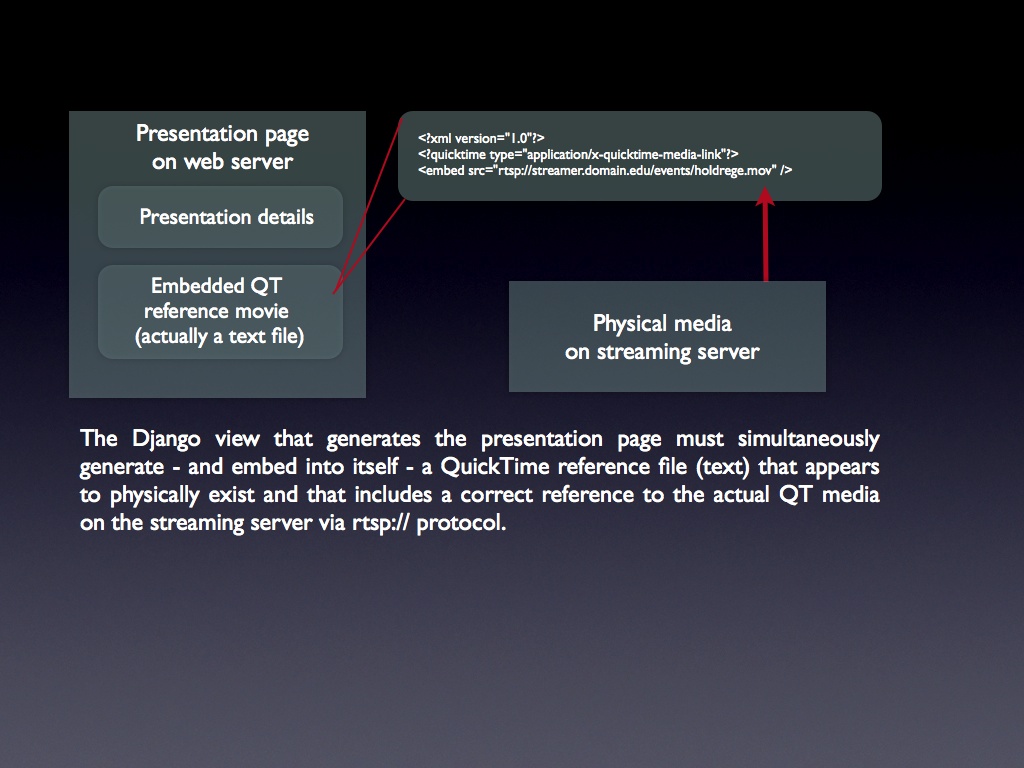
Embedding a stream from an external QTSS server is not quite as straightforward as embedding a typical QuickTime movie. Video comes from QTSS over the rtsp:// protocol, rather than http://. And there’s the catch: You can’t embed an rtsp stream directly into a web page — instead, you need to embed a fake QuickTime movie (a “reference movie”), which is actually a text file with the .mov extension. That text file simply references the full URL of the rtsp stream coming from QTSS. The contents of a reference movie file might look like this:


Here’s where things get interesting as far as Django is concerned. We don’t want to have to create a physical reference movie for every single stream we serve. And yet, at the HTML level, we have to embed something that looks like a reference to a physically external movie file, e.g.:


So how can we make Django think that /presentations/webcast-archive.227.ref.mov is an actual file on the server, which in turn contains the correct reference to the rtsp stream coming from the streaming server? In effect, it’s a “view within a view.”
webcast_setup
Click for larger version

Displaying the presentation page is straightforward Django – I won’t get into that here. But here’s how the “view within a view” stuff works. In the object section of the presentation page template there is a reference to:


which resolves to something like:


When the browser hits that line, it requests /presentations/webcast-archive.267.ref.mov from the server, which in turn triggers this entry in urls.py:

url(r'^presentations/webcast-archive.(?P\d+).ref.mov$',
'workshops.views.presentation_webcast_archive',
name='workshops_presentation_webcast_archive'),

So after the presentation page has been rendered by Django and sent to the browser, a second (very simple) view, presentation_webcast_archive, is called, which is simply:

def presentation_webcast_archive(request, pres_id):
    """
    Generate a virtual QuickTime reference movie on the fly,
    to be embedded in presentation webcast pages.
    """

    pres = get_object_or_404(Presentation,id=pres_id) 

    return render_to_response( 'workshops/presentation_webcast_archive.txt',
        {
            'p': pres,
        }, context_instance=RequestContext(request),
    )

That view spits out the same presentation object to a different template, presentation_webcast_archive.txt, which consists of:


Where webcast_path and webcast_filename are fields on the model representing the physical location of the QuickTime media on the streaming server (not the web server). After a workshop week is over, staff only need to hint the saved archive files, upload them to a directory and filename on the streaming server, enter those paths in the Django admin, and check the “Has Webcast” box. The rest is automatic.

In a previous, PHP-based version of this system, we had to prepare an actual reference movie for every archive stream we hosted. By using this “view within a view” technique, Django has let us remove that part of the workflow.

Spaghetti Dogs

Had some freaky food fun today… cut hot dogs into segments, pushed pieces of dry spaghetti through, boiled. Despite the faces in these shots, Miles loved them, said they looked like Cerise Tinh from Star Wars… without a face.

After clicking Play button, click icon at lower right of slideshow to view full-screen.

Flickr set

Gas vs. Charcoal

In some circles, the gas vs. charcoal grill debate is like red state/blue state, saints vs. atheist heathens. Charcoal purists swear there’s a noticeable taste difference, while gas users claim there is none, or that if there is, it’s minuscule compared to taste factors that come from the dry rub or marinade, cooking technique, and quality of meat. Some even cite studies “showing that there is no effective taste difference between food cooked with gas vs. charcoal.” Charcoal users claim that if you can’t taste the difference, you’re not paying attention. There’s also a big romance factor associated with charcoal – piling up, lighting, tending the coals is part of the ritual, and rituals are important. I can dig that, but happily trade it for the convenience of being able to come home from work late and start grilling immediately. And I’m just not sure I buy the taste difference thing, unless you’re wanting to make a real smoker.

I’ve found that some charcoal enthusiasts think gas grills don’t produce smoke at all… which is absolutely not true. A gas grill is not an oven! The smoke from gas grills can be voluminous (even scary), and comes from the burning off of fats and drippings from meat, as well as the carbonized residue of previous grilling sessions. Yep, it’s a different kind of smoke from charcoal smoke, but it’s definitely smoke.

Our family are gas peeps – we sort of skipped the charcoal phase and went straight for convenience. For us, the gas decision was partly environmental, wanting to sidestep or reduce particulate emissions that come from burning wood, for the same reason newer houses don’t even come with fireplaces.

Charcoal grills emit more carbon monoxide, particulate matter and soot into the atmosphere, contributing to increased pollution and higher concentrations of ground-level ozone.

In fact, in Canada, charcoal is now a restricted product under the Hazardous Products Act. But the carbon footprint question is more complicated than it appears on the surface – charcoal may come from renewable forests, which in turn consume the same amount of CO2 as the grills they fuel produce. Then again, a lot of charcoal products are infused with chemicals to make it easier to light, burn longer, etc. Slate has a great piece on the environmental factors in the gas vs. charcoal question.

Then there’s the cost factor – gas grills cost more, but reqire far less expenditure on fuel – a round of charcoal cooking can cost up to $5.00 in briquettes, while gas might clock in at around $0.50 per session.

OK, poll time – do you do gas or charcoal? Let me know in the comments whether you can taste the difference.

What kind of grilling do you do?

View Results

Here’s a pretty good side-by-side comparison chart, though it conveniently skips the environmental factors.

I’m a Hacker

The unfortunate but sometimes hilarious side-effect of having the last name “Hacker” — occasional emails like this one.

Email: queen5050pil@ymail.com
Message:
pls are you a hacker, if yes pls can you get for me cc with the balance and ATM pin visa and master cards or can you hack into any bank system mostly nigerian banks, pls reply asap thanks.

Srsly.

Headbanging with QuickTime

At the UC Berkeley Graduate School of Journalism and the Knight Digital Media Center, we’ve used Quicktime Streaming Server successfully for years. We mostly love it, but recently I’ve been banging my head against something that’s driving me nuts.

First, understand that .mov files on QTSS need to have a “hint” track added in order to enable genuine streaming. We run live webcasts with something called Wirecast Pro which lets us interleave titles, images, and output from a presenter’s desktop directly into live streams. It also records .mov files of those streams to disk for our webcast archives. After a conference ends, all I had to do was use QuickTime to add hint tracks to the recorded files and put them on our streaming server.

Recently we found that .mov files created with Wirecast would completely crash (hard!) QuickTime player when served from the streaming server into the browser. After much discussion on the QTSS mailing list, I was able to positively identify the problem as a bug in Apple’s hinting routine. Until the bug gets fixed, a developer at Apple recommended that I use the Penguin MP4 Encoder to add the hint tracks, rather than Apple tools.

That worked perfectly, but raised a separate problem – while the files will stream, they can no longer be played directly from the desktop (we offer a separate Download link). Attempting to play them results in an unhelpful “This movie file is apparently corrupt” message.

Thought I would go back to the drawing board and try to remove the hint tracks added by Penguin, so I could try a different approach. Can’t remove them in QuickTime since I can’t open them in QuickTime. Can’t remove them with the qtmedia command line binary that comes with OS X Server. Fortunately Penguin’s command-line tool does provide an “-unhint” option… but attempting to use that crashes Penguin.

So I’m stuck with a set of .mov files that play fine from QTSS but not locally, due to  weirdo hint tracks. And I can’t find a tool to remove  the hint tracks without crashing.

That’s my day so far. How’s yours?

Longevity of Solid State Memory Cards?

Late last year, our house was broken into and a bunch of electronics were stolen, including the MiniDV video camera we had had since our wedding (fortunately the thief didn’t take all of our saved tapes). My video workflow over the past decade has consisted of shooting (judiciously), occassionally making a short web video, and putting the tape away in a cabinet for the archives.

When the camera was stolen, I replaced it with an HD camera that stores video data on SD cards. The usual workflow for SD-based cameras is that you extract what you need to disk when the card is full, then erase and re-use it. But I don’t always have time to do the reviewing and capturing every time, and don’t always feel comfortable erasing the card and starting over to shoot more footage. The question becomes, what is the best way to store this data long term?

I could of course buy another external hard drive dedicated to the task. They’re cheap enough, but experience teaches that disks are fallible, so then you get into the problem of having to back up what could quickly become terabytes of data.

Another solution would be to buy archival grade DVDs and copy data to them as cards fill up.

A final option would be to NOT reuse SD cards, but to replace them when full instead, and stack them in the cabinet for archival purposes just as I used to do with MiniDV tapes.

Doing some comparison shopping, it looks like the price ratio between using archival DVDs and buying new SD cards is similar enough to be neglible. The question then becomes, how do the shelf lives of these two media compare? If you search for information on the longevity of SD cards, you find lots of information about how they’re only good for a limited number of read/write operations before they start to fail… but that’s not what I’m interested in. I’m talking about writing to them once, only reading them a few times max, but storing them for years or decades. It’s surprisingly difficult to find information on how long data on an SD card will last if NOT used.

I’m confident they’d be fine for a few years. But what about 20? What about 50? (yes, I want my kid to be able to access this data when he’s grown up, hopefully without going through the hoops I recently did dealing with my dad’s 60-year-old 8- and 16-mm film stock.

Archival DVDs claim to be good for 100 years, and I’d be willing to trust that figure, or something like it, even though none of them have been around long enough for the estimate to be verified. But for convenience, I’d love to be able to skip the transfer step and just store SD cards long-term. Without information on that, I’m skittish about it.

Anyone have info on long-term shelf-life of unsed SD cards?

Poor Babies, Backyard Media, Hilowbrow and More

It’s been ages since I’ve promoted Birdhouse Hosting customer sites here on the blog — but that doesn’t mean we’ve stopped taking on new users! Here’s a quick list of some of the best new sites to join Birdhouse in the past six months (full list here).

backyardmedia.org
As a writer and multimedia journalist, Wroth brings subjects to life with fresh and media-appropriate use of photography, audio, video and the written word. She earned a Masters from UC Berkeley’s Graduate School of Journalism in May 2008. Based in the San Francisco Bay Area, she focuses on food and agriculture, health, and urban renewal.

Hilobrow
“Middlebrow is not the solution.” A Josh Glenn project site.

ktgkids.com
Kid-friendly version of the classic Archive of Misheard Lyrics.

jaimegross.com
Jaime Gross is a freelance journalist based in San Francisco, California. She writes about culture, design, art, architecture and travel—and the places where they overlap—for the New York Times; T, the New York Times Style Magazine; Travel + Leisure; Dwell; and Town and Country, among others.

swisswatching.com
Jackie and Seth are spending a couple years in Switzerland, living just outside of Lausanne in Renens VD.

haomama.us
“Raising Children in Mandarin and English. This site is part of my never-ending quest to find and share resources that make learning Chinese a fun and organic part of our children’s lives.”

Poor Babies
Life is Tough for the Rich and Powerful. Another Dan Gillmor project.

mediactive.com
From journalist/technologist Dan Gillmor comes Mediactive: A Users’ Guide to Media in a Networked Age. “My goal is to help people become active and informed users of media, as consumers and as creators. We are in a media-saturated age, more so all the time, and we need to find ways to use media to our — and our society’s — best advantage.”

tomabate.com
Tom Abate is a former small-press publisher turned newspaper reporter who lives in Castro Valley.

Python-MySQL Connections on Mac OS

Update: This entry has been updated for Snow Leopard.

In all of Mac-dom, there are few experiences more painful than trying to get Python tools to talk to a MySQL database. Installing MySQL itself is easy enough – Sun provides a binary package installer. Python 2.5 comes with Mac OS X. If you enable Apache and PHP, your PHP scripts will talk to your installed MySQL databases just fine, since PHP comes bundled with a MySQL database connector. But try to get up and running with Django, TurboGears, or any other Python package where MySQL database access could be useful (or needed), and you’re in for a world of hurt.

Update: I finally did manage to get Python and MySQL playing nice together, but it took a few more contortions beyond what’s described in the recipes found scattered around the interwebs. I’ve added my solution at the end of this post.

Continue reading “Python-MySQL Connections on Mac OS”