Lion’s Broken Color Picker

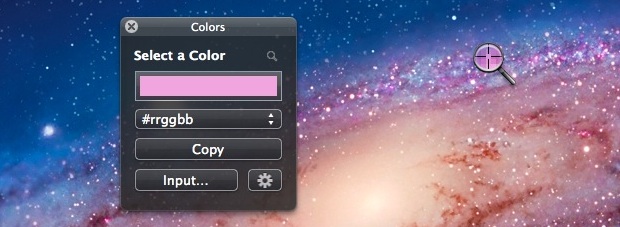
One of two mystifying downgrades that come with OS X Lion / Mountain Lion* is the fact that all traces of hex values have been removed from the Digital Colorimeter. For hundreds of thousands of web developers, obtaining hex values is the only purpose of Colorimeter, and I suspect that web developers are the bundled app’s main users. This one is a total head-scratcher. Hopefully the change is a bug, not a feature, and it’ll be back someday.

Meanwhile, if you’re looking for a workable free replacement, check out this simple Colors app. Not quite as elegant, but gets the job done just fine.

color-picker-os-x-lion

* The other mystifying downgrade in Mountain Lion is the “snooze” feature in iCal alerts. You used to be able to set a snooze to be re-reminded a few hours later, or the day before, or whatever you like. Now your only option is to acknowledge the alert and dismiss it, so the daily GTD workflow for bazillions of users is completely broken. What went through the heads of the designers removing this critical feature is anyone’s guess.

Spam Training on cPanel for Desktop Mail Clients

This is primarily a guide for administrators of cPanel hosting systems, though tech-savvy cPanel users with shell access will be able to use this technique as well.

Users of webmail systems like GMail, Yahoo, etc. are accustomed to having a “Mark as Spam” button in the interface. Clicking the button tells the server that the selected message is spam, to prevent similar messages from showing up in the inbox again. So how can administrators of standard cPanel-based hosting systems provide similar functionality?
Continue reading “Spam Training on cPanel for Desktop Mail Clients”

Best Mac Upgrade Ever

A couple months ago, upgraded my wife’s old Mac Mini to a 13″ MacBook Air with SSD, and was stunned at how it blew my 3-yr-old MacBook Pro out of the water, performance-wise. Having 8GB rather than 4GB was part of it, but the real clincher was the fact that it shipped with an SSD drive rather spinning platters. I had read about the huge performance gains that solid state gets you, but was unprepared for just how great it feels to work in all-RAM environment. No more waiting 45 seconds for Photoshop to launch (four seconds, anyone?). No more feeling the crunch as you’re trying to start that Skype conference while both Backblaze and Spotlight indexing are competing for swap space.

Continue reading “Best Mac Upgrade Ever”

Masterful Dreadlocks

Spotted at the sandwich shop today:

Masterful Dreadlocks at the Sandwich Shop

At first thought it might be Jaron Lanier, but nope – a construction worker on his lunch break. Had to wonder how many years it had taken to grow these, and what kind of ecosystem lived within.

Whatever his reasons, a respectable accomplishment.

Tweetbot Bookmarklet for Chrome

Despite a few quibbles, I’ve pretty much fallen in love with the desktop Twitter client Tweetbot. But the one thing I really missed from the official Twitter for Mac client was a good browser bookmarklet for Chrome, so I could start a new tweet from the current web page’s URL and document title.

I did find one referenced in this review, but it was DoA in Chrome – does nothing when clicked. With a bit of monkeying around, I’ve modified it to get along with Chrome:

javascript:window.location='tweetbot:///post?text='+encodeURIComponent(document.title)+encodeURIComponent(' ')+encodeURIComponent(window.location.href)

To install: Copy the code above to your clipboard. Create a new bookmark (of any page) and edit its properties. Paste over the URL with the contents of your clipboard. Save, and Bob’s your uncle!

Full-Screen Album Art in iTunes

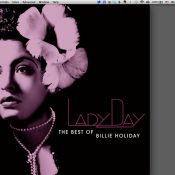
If there’s one thing that bums me out, it’s an MP3 without big beautiful cover art. Like all y’all old-school LP guys, having high-quality album cover art on full display is part of the listening experience.  I’ve just spent the past couple years digitizing my entire LP and CD collections, then tracking down the best-possible cover art for every single one of the 5,000+ albums I ended up with — even if it meant photographing or scanning covers by hand.

With all that work done, I wanted to find a good way to display cover art on the Mac as cleanly as possible, without the clutter of other app windows in the way, and ideally without turning to 3rd-party software.

At first, I thought CoverFlow would be the One True Way, but  in practice, CoverFlow can’t be trusted. I find it constantly gets stuck on a cover, and no amount of toggling the “Now Playing / Selected” widget or switching between List View and CoverFlow view will coax it out of its rut.

Here’s the recipe I came up with – let me know if you have a better one:

0) Make sure all of your music has the highest-quality album art possible :) CoverScout is an awesome tool if you want to automate/simplify the process somewhat.

1) Make sure the Now Playing / Selected preview window is showing by clicking the disclosure triangle at the bottom left.
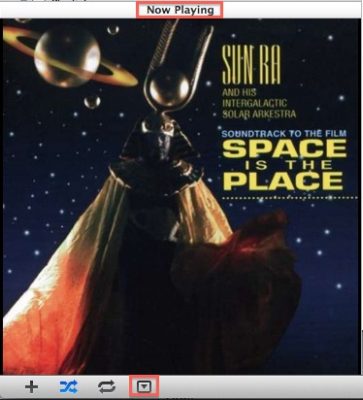
2) Double-click on the album cover to open it in a new, detached window (never knew you could do that, amiright?)

3) Use Mission Control to move that window to a new desktop. If you’re not already using multiple desktops, just drag the detached cover art window to a blank space near the top of Mission Control.

4) Switch to the new desktop and maximize the Now Playing window.

Now, to see your full-screen album art quickly, just switch to the other desktop. There are several ways to do this quickly in OS X, but I prefer either the three-finger sideswipe (if you have a laptop or trackpad) or Ctrl+Arrow[Left/Right].

Yes, there’s a small bit of setup, but since Mountain Lion restores all windows to their previous state after a reboot, you never have to do it again.

BTW, the cover art display isn’t just pretty – it’s functional too. Hover over the art and a controller will appear, giving you full scrub / skip / pause control, and letting you see the name of the current track and album.

Bonus: Remote Control
The really bad-ass thing is that you don’t have to do this from the Mac where the iTunes library lives – if you have a media server Mac that’s separate from the one you do your work on, you can run it all on a  by remote control, via iTunes Home Sharing.  I do my work on a MacBook Pro from the living room, which talks to iTunes on a Mac Mini server in the office which houses the music collection. The MacBook’s instance of iTunes in turn sends its output via AirPlay to an AirPort Express connected to the stereo across the living room from me. It’s a big crazy triangle, but the experience is completely smooth and user friendly (much nicer than the old VNC solution I used to use). If you would prefer to use a VNC client, I can’t recommend Jolly’s highly enough – the elastic screen feature is trippy, but does an amazing job of compensating for the fact that you might be controlling a huge monitor from a small one.

Little Farm –> Alvarado

A while ago, Miles and I discovered that the fire road leading from Little Farm in the Berkeley Hills led all the way to Alvarado Park (a wonderful old WPA park) in Richmond, near his school – around seven miles through winding, rolling hills. After working out a detour for the section that doesn’t allow bikes, invited a bunch of parents and their kids to gather for a multi-family ride, which happened yesterday in absolutely gorgeous post-Thanskgiving weather.

Generally downhill on the way there, generally uphill on the way back, kids only had to get off and push a couple of times – was so proud of them for having the gumption to go for it and complete the 14-mile RT. Wildcat Canyon Trail still a bit muddy from recent rains, but getting mud stripes up our backs just added to the fun. Such a fantastic way to start the day, and way more fun than fighting crowds in the Black Friday scene.

None of my photos came out that great, but did manage to capture a usable GPS track. Here’s the live version.

Group photo by Rachel Hollowgrass:

The History of Misheard Lyrics

A lifetime ago, I created The Archive of Misheard Lyrics, where people could go to log all of the lyrics they *thought* they had always known, only to to discover in some embarrassing circumstance how wrong they had been all along. I later sold the site, and the purchaser destroyed most of the functionality and gave it the current hideous design. I’m pretty much embarrassed to attach my name to it these days.

Anyway, just stumbled on this video of a group playing/acting out a few dozen of the most popular misheard lyrics from the site – pretty funny.

Via Laughing Squid:

“Experimental video musical group cdza has created History of Misheard Lyrics | Opus No. 13, a live-performed music video montage that covers 70 years of misheard song lyrics. It features the vocals of Ryan Melia and Lora Lee Gayer and Michael on bass.”