
Headbanging with QuickTime

At the UC Berkeley Graduate School of Journalism and the Knight Digital Media Center, we’ve used Quicktime Streaming Server successfully for years. We mostly love it, but recently I’ve been banging my head against something that’s driving me nuts.

First, understand that .mov files on QTSS need to have a “hint” track added in order to enable genuine streaming. We run live webcasts with something called Wirecast Pro which lets us interleave titles, images, and output from a presenter’s desktop directly into live streams. It also records .mov files of those streams to disk for our webcast archives. After a conference ends, all I had to do was use QuickTime to add hint tracks to the recorded files and put them on our streaming server.

Recently we found that .mov files created with Wirecast would completely crash (hard!) QuickTime player when served from the streaming server into the browser. After much discussion on the QTSS mailing list, I was able to positively identify the problem as a bug in Apple’s hinting routine. Until the bug gets fixed, a developer at Apple recommended that I use the Penguin MP4 Encoder to add the hint tracks, rather than Apple tools.

That worked perfectly, but raised a separate problem – while the files will stream, they can no longer be played directly from the desktop (we offer a separate Download link). Attempting to play them results in an unhelpful “This movie file is apparently corrupt” message.

Thought I would go back to the drawing board and try to remove the hint tracks added by Penguin, so I could try a different approach. Can’t remove them in QuickTime since I can’t open them in QuickTime. Can’t remove them with the qtmedia command line binary that comes with OS X Server. Fortunately Penguin’s command-line tool does provide an “-unhint” option… but attempting to use that crashes Penguin.

So I’m stuck with a set of .mov files that play fine from QTSS but not locally, due to  weirdo hint tracks. And I can’t find a tool to remove  the hint tracks without crashing.

That’s my day so far. How’s yours?

Longevity of Solid State Memory Cards?

Late last year, our house was broken into and a bunch of electronics were stolen, including the MiniDV video camera we had had since our wedding (fortunately the thief didn’t take all of our saved tapes). My video workflow over the past decade has consisted of shooting (judiciously), occassionally making a short web video, and putting the tape away in a cabinet for the archives.

When the camera was stolen, I replaced it with an HD camera that stores video data on SD cards. The usual workflow for SD-based cameras is that you extract what you need to disk when the card is full, then erase and re-use it. But I don’t always have time to do the reviewing and capturing every time, and don’t always feel comfortable erasing the card and starting over to shoot more footage. The question becomes, what is the best way to store this data long term?

I could of course buy another external hard drive dedicated to the task. They’re cheap enough, but experience teaches that disks are fallible, so then you get into the problem of having to back up what could quickly become terabytes of data.

Another solution would be to buy archival grade DVDs and copy data to them as cards fill up.

A final option would be to NOT reuse SD cards, but to replace them when full instead, and stack them in the cabinet for archival purposes just as I used to do with MiniDV tapes.

Doing some comparison shopping, it looks like the price ratio between using archival DVDs and buying new SD cards is similar enough to be neglible. The question then becomes, how do the shelf lives of these two media compare? If you search for information on the longevity of SD cards, you find lots of information about how they’re only good for a limited number of read/write operations before they start to fail… but that’s not what I’m interested in. I’m talking about writing to them once, only reading them a few times max, but storing them for years or decades. It’s surprisingly difficult to find information on how long data on an SD card will last if NOT used.

I’m confident they’d be fine for a few years. But what about 20? What about 50? (yes, I want my kid to be able to access this data when he’s grown up, hopefully without going through the hoops I recently did dealing with my dad’s 60-year-old 8- and 16-mm film stock.

Archival DVDs claim to be good for 100 years, and I’d be willing to trust that figure, or something like it, even though none of them have been around long enough for the estimate to be verified. But for convenience, I’d love to be able to skip the transfer step and just store SD cards long-term. Without information on that, I’m skittish about it.

Anyone have info on long-term shelf-life of unsed SD cards?

Python-MySQL Connections on Mac OS

Update: This entry has been updated for Snow Leopard.

In all of Mac-dom, there are few experiences more painful than trying to get Python tools to talk to a MySQL database. Installing MySQL itself is easy enough – Sun provides a binary package installer. Python 2.5 comes with Mac OS X. If you enable Apache and PHP, your PHP scripts will talk to your installed MySQL databases just fine, since PHP comes bundled with a MySQL database connector. But try to get up and running with Django, TurboGears, or any other Python package where MySQL database access could be useful (or needed), and you’re in for a world of hurt.

Update: I finally did manage to get Python and MySQL playing nice together, but it took a few more contortions beyond what’s described in the recipes found scattered around the interwebs. I’ve added my solution at the end of this post.

Continue reading “Python-MySQL Connections on Mac OS”

Who Owns Your RSS?

In a case with far-reaching implications for the widespread practice of automated aggregation of headlines and ledes via RSS, GateHouse Media has, for the most part, won its case against the New York Times, who owns Boston.com, who in turn run a handful of community web sites. Those community sites were providing added value to their readers in the form of linked headlines, pointing to resources at community publications run by GateHouse. The practice of linked headline exchange is healthy for the web, useful for readers, and helpful for resource-starved community publications. However, for reasons that are still not clear (to me), GateHouse felt that the practice amounted to theft, even though the Boston.com sites were publishing the RSS feeds to begin with.

Trouble is, RSS feeds don’t come with Terms of Use. Is a publicly available feed meant purely for consumption by an individual, and not by other sites? After all, the web site you’re reading now is publicly available, but that doesn’t mean you’re free to reproduce it elsewhere. The common assumption is that a site wouldn’t publish an RSS feed if it didn’t want that feed to be re-used elsewhere. And that’s the assumption GateHouse is challenging.

Let’s be clear – this is not a scraping case (scraping is the process of writing tools to grab content from web pages automatically when an RSS feed is not available). Boston.com was simply utilizing the content GateHouse provided as a feed. I would agree that scraping is “theft-like” in a way that RSS is not, but that’s not relevant here.

In a weird footnote to all of this, GateHouse initially claimed that Boston.com was trying to work around technical measures they had put in place to prevent copying of their material. Those “technical measures” amounted to JavaScript in its web pages, but boston.com was of course not scraping the site — they were merely taking advantage of the RSS feeds freely provided by GateHouse. In other words, they were putting their “technical measures” in their web pages, not in their feed distribution mechanism, missing the point entirely.

GateHouse seems primarily concerned with the distinction between automated insertion of headlines and ledes (e.g. via RSS embeds) vs. the “human effort” required to quote a few grafs in a story body. Personally, I don’t see how the two are materially different, or how one method would affect GateHouse publications more negatively or positively than the other. If anything, now that GateHouse has gotten its way, they’re sure to receive less traffic.

The result is that Boston.com has been forced to stop using GateHouse RSS feeds to automatically populate community sites with local content. If cases like this hold sway, there will soon be a burden on every site interested in embedding external RSS feeds to find out whether it’s OK with each publisher first.

PlagiarismToday sums up the case:

It was a compromise settlement, as most are, but one can not help but feel that GateHouse just managed to bully one of the largest and most prestigious new organizations in the world.

Also:

The frustrating thing about settlements, such as this one, is that they do not become case law and have no bearing on future cases. If and when this kind of dispute arises again, we will be starting over from square one.

I’m trying to figure out who benefits from this decision… and I honestly can’t. GateHouse loses. Boston.com loses. Community web sites with limited resources lose. And readers lose. Something’s rotten in the state of Denmark.

Django and graphviz

I’ve been watching the django-command-extensions project out of the corner of my eye for a while, promising to give it a shot. With the extensions added to your installed_apps, manage.py grows a bunch of additional functionality, such as the ability to empty entire databases, run periodical maintenance jobs, generate a URL map, get user/session data… and to generate graphical visualizations from models.

A recent post by John Tynan on the power of command extensions finally kicked my butt enough to give it a spin. Essential stuff for debug and development work.

Getting visual graphing to work takes a bit of extra elbow grease, since it depends on a working installation of the open graphviz utilities as well as a Python adapter for graphviz, PyGraphviz. graphviz itself has both command-line utilities (which I got via macports) and a GUI app for opening and manipulating the .dot files that graphviz generates.

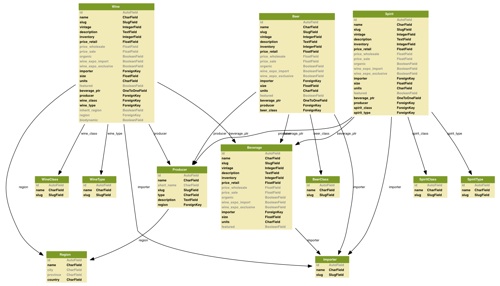
Took some wringing of hands and gnashing of teeth to get macports to happily install all of the pieces, but finally ended up with this:

python manage.py graph_models beverages > beverages1.dot

Beverages-Model
Click for PDF version

The key to getting decent resolution output, I found, is to output a graphviz .dot file rather than PNG. You can’t control the relatively low resolution of the latter, but .dot files are vector, and can be exported from the GUI Graphviz app to any format, including PDF (infinite resolution!).

Amazing to be able to visualize your models like this, but it’s not perfect. What you don’t see reflected here is the fact that Wine, Beer, etc. are actually subclassed from the Beverage model. And the arrows don’t even try to point to the actual fields that form table relations, which would be nice. graph_models has a way go, but it’s still a terrific visualization tool for sharing back-end work with clients in a way that makes immediate sense.

Video Service Compression Test

A quick comparison of video compression quality at three of the major video upload services. I posted the same video file to YouTube, Flickr, and Vimeo, and have added them here alongside the original for comparison. I think the results speak for themselves.

miles_thump The original video was not shot with a video camera, but with a Canon SD1100S pocket still camera, which generated AVI files. I stitched a few together in QuickTime and saved the result as a QuickTime .mov. I did not alter any of the compression settings, and ended up with a file using the old standby codec Motion JPEG OpenDML at 640×480, 30fps, at a data rate of 15.75 mbit/sec.

Because it’s 60MBs, I’m linking to the original rather than embedding it.

Subject, by the way, is my son Miles (6) stomping in puddles on a rainy day at Jewel Lake in the Berkeley Hills.

YouTube clearly generates the worst results, with a huge amount of compression artifacts and general jerkiness:

To be fair, YouTube also offers a “high quality” version, which doesn’t look much (any?) better. Especially not compared to Flickr’s and Vimeo’s “normal” output.

Update Sept. 2013: The YouTube version above is no longer the original version. In 2013 I re-uploaded a bunch of old videos, and found that the YouTube quality has increased dramatically. I no longer stand by any of the negative comments about YT video quality stated here.

Few people use Flickr Video, though the feature has been available for nearly a year. Results are definitely better than YouTube, but not as good as the original, and very similar to Vimeo (bottom).

I expected Vimeo to be the clear winner. Vimeo is known for excellent video quality (and the site design is excellent too). But now that I see them side by side, I’m having trouble finding much in the way of quality difference between Vimeo and Flickr. Downsides: It took Vimeo 70 minutes to make the video available after upload, and the tiny size of Vimeo’s social network means the video will get far less “drive-by” traffic than it will on YouTube.

Notes on a Django Migration

Powered by Django. Earlier this year, I inherited responsibility for the website of the Knight Digital Media Center at UC Berkeley’s Graduate School of Journalism. The site is built with Django, a web application framework written in Python. The J-School has primarily been a PHP shop, using a mixture of open-source apps — lots of WordPress, Smarty templates and piles of home-brew code. Because it’s grown organically over time with no clear underlying architecture and a constantly changing array of publications to support, the organization sits on top of dozens of unrelated databases.

These are my notes and observations on how the J-School got into this mess, why we’ve fallen in love with Django, and how we plan to dig ourselves out.

Continue reading “Notes on a Django Migration”

Could You Work in Windows?

How much is your Mac – or rather your Mac lifestyle – worth to you?

Just so we have some standard of reference as to what constitutes a “killer” job offer, we’re defining it here as making 25% more than you make now, all other factors being equal (same commute, same quality of co-workers, same boss, etc.)

Obviously, people who already work all day in Windows shouldn’t vote (but feel free to comment).

If you got a killer job offer but found out you'd have to use Windows all day every day, would you take it?

View Results

Podcast Diet

Podcastlogo Podcasting changed my life.

There, I said it. Melodramatic, but true. When free time is whittled down to razor-thin margins, something’s gotta give, and media consumption is often the first luxury to go. And, speaking for myself, when I’m tired at the end of the day and give myself an hour of couch time, I’m not exactly predisposed to turn to the news. “Man vs. Wild” is more like it.

The one chunk of time I get all to myself every day is the daily commute (by bike or walk+train), which amounts to just over an hour a day. A few years ago, commute time was music time, but podcasting changed all that.

With a weekly quota of five hours consumption time, didn’t take long to subscribe to more podcasts than I could possibly digest before the next week rolled around. But I continue to hone the subscription list. Here are some of the podcasts I’ve come to call friends:

Links are to related sites – search iTunes for these if podcast links aren’t obvious.

This Week in Tech: Tech maven Leo Laporte used to do great shows at ZDTV, now runs his own tech news & info podcasting network. I appeared on his TV show a few times back in the BeOS days; now I’m just a faceless audience member. Show gets rambly and too conversational at times, but they do a good job of traversing the landscape, and there are plenty of hidden gems. Frequent co-host John Dvorak drives me crazy, despite his smarts.

Podcacher: All about geocaching, with “Sonny and Sandy from sunny San Diego, CA.” Great production values. Love it when the adventures are huge, but get bored with all the geocoin talk (unfortunately fast-forwarding through casts and bicycling don’t go well together, especially since losing tactile control after moving to the iPhone). Still, lots of tips, excellent anecdotes, and occasional hardware reviews.

Radiolab: I’ll go with their own description: “On Radio Lab, science meets culture and information sounds like music. Each episode of Radio Lab. is an investigation — a patchwork of people, sounds, stories and experiences centered around One Big Idea.” I love what they do with sonic landscapes. I can’t think of a better example of utilizing the podcasting medium’s unique characteristics. The shows are mesmerizing, and welcome relief from my tech-heavy audio diet.

This American Life: Everyone’s favorite NPR show. Excruciatingly wonderful overload of detail on the bizarre lives or ordinary Americans. Your soul needs this show.

Slate Magazine Daily Podcast: They say it would be a waste of the medium’s potential to just have someone read stories into a microphone. I beg to differ. I don’t have time to read Slate, but love their journalism. I’m more than stoked to receive a digest version of the site through my ear-holes.

FLOSS Weekly: Another Leo Laporte show, but in this one he gets out of the way and lets his guests do the talking. All open source, all the time. Usually interviews with leaders / founders / spokespeople for various major OSS initiatives. Great interviews recently with players from the Drizzle and Django camps.

Stack Overflow: Who woulda thunk a pair of Windows-centric web developers would have captured my attention? But great insight here into the innards of web application construction. Geeks only.

NPR: All Songs Considered If you’re old-and-in-the-way like me, feeling like your musical soul isn’t get fed the way it should, you could do a lot worse than subscribe to All Songs Considered – annotated rundown of recent (and sometimes not-so-recent) discoveries that remind you why music is Still Worth Paying Attention To.

This Week in Django: Part of the reason I’ve been so quiet lately is that I’m deeply immersed in Django training, having inherited a fairly complex Django site at work (more on that another day). This podcast is pretty hardcore stuff, for Django developers only. Can’t pretend to understand it all, but right now it’s part of the immersion process, and is helping me gain scope on the Django landscape.

The WordPress Podcast: I spend more of my time (both at work and at home) tweaking on WordPress publication sites than anything else, and this is a great way to stay abreast of new plugins, security issues, techniques, etc. Wish it was more technical and had a faster pace, but it’s the best of the WordPress podcasts.

Between the Lines: Back in my Ziff days, I worked for the amazing Dan Farber, who’s still going strong at ZD. This is my “check in with the veteran tech journalists” podcast, and is a serious distillation of goings-on in the tech world. Always a good listen.

Obviously there’s no way to fit all of these into the weekly commute hours, but I try. No time to digest more, but dying to know what podcasts have you gripped. Let me know.

Music: Minutemen :: Storm In My House

Notes on Open APIs

Geocachingicon Readers following this blog have seen my occasional references to geocaching – a sport/hobbby/pastime that Miles and I do quite a bit of, which involves using a hand-held GPS to place and find hidden treasures – either in the woods or in the city.

One of the many unusual aspects of geocaching is the fact that it relies completely on the existence of a single web-based database, represented by the site geocaching.com. As web-based database applications go, the site is a modern marvel. The database represents hides, finds, people and their discovery logs, travel bugs (ID’d items that travel the world, hopping from container to container), and more, all sliced and diced a million ways to Sunday. The site is deeply geo-enabled, letting users hone in on hides near them, along a route, or near arbitrary destination locations. It’s also one of the best examples I’ve seen of useful Google Maps mashups, relying heavily on the open APIs provided by Google to integrate its cache database with Google’s map database. This is what map mashups are all about, and geocaching.com has done an amazing job with them.

As the popularity of personal GPSs rises, so does the game’s popularity. But when geocaching.com goes down (or slows down), so does the game, which involves more than half a million hides world-wide, and many millions of players. The site, which is, sadly, based on Microsoft database technology and ASP, does go down from time to time (big surprise); it’s a “single point of failure” in bit-space for the entire meat-space game – a precarious position. Continue reading “Notes on Open APIs”