Shorter URLs with Base62 in Django

Update, 4/2017: See this StackOverflow answer for a different (and probably shorter) approach to this problem.

URL shorteners have become a hot commodity in the age of Twitter, where every byte counts. Shorteners have their uses, but they can also be potentially dangerous, since they mask the true destination of a link from users until it’s too late (shorteners are a malware installer’s wet dream). In addition, they work almost as a second layer of DNS on top of the internet, and a fragile one at that – if a shortening company goes out of business, all the links they handle could potentially break.

On bucketlist.org, a Django site that lets users catalog life goals, I’ve been using numerical IDs in URLs. As the number of items stored started to rise, I watched my URLs getting longer. Thinking optimistically about a hypothetical future with tens of millions of records to serve, and inspired by the URL structure at the Django-powered photo-sharing site Instagr.am, decided to do some trimming now, while the site’s still young. Rather than rely on a shortening service, decided to switch to a native Base 62 URL schema, with goal page URIs consisting of characters from this set:

BASE62 = "abcdefghijklmnopqrstuvwxyz0123456789ABCDEFGHIJKLMNOPQRSTUVWXYZ"

rather than just the digits 0-9. The compression is significant. Car license plates use just seven characters and no lower-case letters (base 36), and are able to represent tens of millions of cars without exhausting the character space. With base 62, the namespace is far larger. Here are some sample encodings – watch as the number of characters saved increases as the length of the encoded number rises:

Numeric Base 62
1 b
22 w
333 fx
4444 bjG
55555 o2d
666666 cN0G
7777777 6Dwb
88888888 gaYdK
999999999 bfFTGp
1234567890 bv8h5u

I was able to find several Django-based URL shortening apps, but I didn’t want redirection – I wanted native Base62 URLs. Fortunately, it wasn’t hard to roll up a system from scratch. Started by finding a python function to do the basic encoding – this one did the trick. I saved that in a utils.py in my app’s directory.

Of course we need a new field to store the hashed strings in – I created a 5-character varchar called “urlhash” … but there’s a catch – we’ll come back to this.

The best place to call the function is from the Item model’s save() method. Any time an Item is saved, we grab the record ID, encode it, and store the return value in urlhash. By putting it on the save() method, we know we’ll never end up with an empty urlhash field if the item gets stored in an unpredictable way (site users can either create new items, or copy items from other people’s lists into their own, for example, and there may be other ways in the future — we don’t want to have to remember to call the baseconvert() function from everywhere when a single place will do — keep it DRY!)).

Generating hashes

So in models.py:

from bucket.utils import BASE10, BASE62, baseconvert

...

def save(self):

    # Do a bunch of stuff not relevant here...

    # Initial save so the record gets an ID returned from the db
    super(Item, self).save()

    if not self.urlhash:
        self.urlhash = baseconvert(str(self.id),BASE10,BASE62)
        self.save()     

Now create a new record in the usual way and verify that it always gets an accompanying urlhash stored. We also need to back-fill all the existing records. Easy enough via python manage.py shell:

from bucket.models import Item
from bucket.utils import BASE10, BASE62, baseconvert

items = Item.objects.all()
for i in items:
    print i.id
    i.urlhash = baseconvert(str(i.id),BASE10,BASE62)
    print i.urlhash
    print
    i.save()

Examine your database to make sure all fields have been populated.

About that MySQL snag

About that “snag” I mentioned earlier: The hashes will have been stored with mixed-case letters (and numbers), and they’re guaranteed to be unique if the IDs you generated them from were. But if you have two records in your table with urlhashes ‘U3b’ and ‘U3B’, and you do a Django query like :


urlhash = 'U3b'
item = Item.objects.get(urlhash__exact=urlhash)

Django complains that it finds two records rather than one. That’s because the default collation for MySQL tables is case-insensitive, even when specifying case-sensitive queries with Django! This issue is described in the Django documentation and there’s nothing Django can do about it – you need to change the collation of the urlhash column to utf8_bin. You can do this easily with a good database GUI, or with a query similar to this:

ALTER TABLE `db_name`.`db_table_name` CHANGE COLUMN `urlhash` `urlhash` VARCHAR(5) CHARACTER SET utf8 COLLATE utf8_bin NULL DEFAULT NULL COMMENT '' AFTER `id`;

or, if you’re creating the column fresh on an existing table:

ALTER TABLE `bucket_item` ADD `urlhash` VARCHAR( 5 ) CHARACTER SET utf8 COLLATE utf8_bin NOT NULL AFTER `id` , ADD INDEX ( `urlhash` )

Season to taste. It’s important to get that index in there for performance reasons, since this will be your primary lookup field from now on.

Tweak URL patterns and views

Since the goal is to keep URLs as short as possible, you have two options. You could put a one-character preface on the URL to prevent it from matching other word-like URL strings, like:

foo.org/i/B3j

but I wanted the shortest URLs possible, with no preface, just:

foo.org/B3j

Since I have lots of other word-like URLs, and can’t know in advance how many characters the url hashes will be, I simply moved the regex to the very last position in urls.py – this becomes the last pattern matched before handing over to 404.

url(r'^(?P<urlhash>\w+)/$', 'bucket.views.item_view', name="item_view"),

Unfortunately, I quickly discovered that this removed the site’s ability to use Flat Pages, which rely on the same fall-through mechanism, so I switched to the “/i/B3j” technique instead.

url(r'^i/(?P<urlhash>\w+)/$', 'bucket.views.item_view', name="item_view"),

Now we need to tweak the view that handles the item details a bit, to query for the urlhash rather than the record ID:


from django.shortcuts import get_object_or_404
...

def item_view(request,urlhash):        
    item = get_object_or_404(Item,urlhash=urlhash)
	...

It’s important to use get_object_or_404 here rather than objects.get(). That way we can still return 404 if someone types in a word-like URL string that the regex in urls.py can’t catch due to its open-endedness. Note also that we didn’t specify urlhash__exact=urlhash — case-sensitive lookups are the default in Django queries, and there’s no need to specify the default.

If you’ve been using something like {% url item_view item.id %} in your templates, you’ll obviously need to change all instances of that to {% url item_view item.urlhash %} (you may have to make similar changes in your view code if you’ve been using reverses with HttpResponseRedirect).

Handling the old URLs

Of course we still want to handle all of those old incoming links to the numeric URLs. We just need a variant of the original ID-matching pattern:

url(r'^(?P\d+)/$', 'bucket.views.item_view_redirect', name="item_view_numeric"),

which points to a simple view item_view_redirect that does the redirection:


def item_view_redirect(request,item_id):
    '''
    Handle old numeric URLs by redirecting to new hashed versions
    '''
    item = get_object_or_404(Item,id=item_id)
    return HttpResponseRedirect(reverse('item_view',args=[item.urlhash]))

Bingo – all newly created items get the new, permanently shortened URLs, and all old incoming links are handled transparently.

Bamboo Bike – Renovo Pandurban

Back in January 2010, I donated my old Gary Fisher mountain bike to the Peace Corps in Africa and took a leap for my next ride – decided to buy a custom-built bike from a small shop in Portland called Renovo, who specialize in wooden and bamboo bikes (laminated, not raw bamboo stalk like some other bike makers do). Renovo sent me a body measurement chart and the wife diligently took to me with a tape measure, so the resulting frame and parts would be dialed in perfectly for my dimensions.

Renovo builds some incredible stuff – every one of their bikes, from road bikes to mountain bikes to commuters, is a work of art, made with love and incredible craftsmanship. These guys know what they’re doing – in a former life, the Renovo guys were building wooden airplanes.
Continue reading “Bamboo Bike – Renovo Pandurban”

Encouraging users to add avatars to profiles

One of the things that has vexed me since launching bucketlist.org a few months ago is the fact that most users don’t enter any sort of profile information whatsoever – not even an icon/avatar to represent themselves. In fact, I did a quick query the other night and discovered that only 1/4 of users had set up an avatar. This realization was both surprising and disappointing to me — surprising because most users of other social networks (Twitter, Facebook, etc.) go to lengths to make sure their profile info is complete and up to date. People on Twitter know that most people won’t even bother following people who don’t have personal icons.

Why was bucketlist being viewed differently by its users? And what could I do to encourage users to add profile info, or at least images of themselves?

One problem, I realized, was that the default avatar I was using on the site to represent avatar-less users was too bland. It didn’t bother users to be represented like this:

Toyed briefly with the idea of replacing the generic icon with something ridiculous, to motivate people to change it as soon as possible. But I don’t want to annoy or embarrass users. Also contemplated using some kind of Ajax-y banner thing to gently remind users to set up an avatar. Then it hit me last night – I don’t have to show the same image to everyone – why not do it like this:

if showing a bucketlist or goal whose owning user has an avatar, show that
if showing someone else’s list or item with no avatar, show the usual generic avatar
if showing your own list or item and you dont have an avatar, show something else

This trick replies on a bit of psychology – since the user probably assumes that everyone sees their lists and items with same icon they’re currently seeing, there’s a strong incentive to change it. Here’s what I came up with, based somewhat on a similar approached used for new Twitter accounts:

The other difference is that, while most avatars on the site link to the item owner’s main list page, this one links to the user’s own profile editing page. I suspect that part of the problem was that many users just didn’t notice or care that they even could edit their profiles, despite the presence of a giant “Edit Your Profile” button. Now there’s no mistaking the option.

After a week with this system, we found little to no increase in the number of users adding avatars to their profiles, so I upped the ante a bit by throwing up a friendly splash screen when the following conditions were true:

  • User has been logged in for three minutes
  • User is currently adding an item
  • User has no avatar
  • User has not yet been “nagged”

After two weeks with this system in effect, I crunched some numbers (using querysets in the Django ORM) and discovered that the new “nag” system raised the percentage of users adding avatars from 24% to 33% – a measurable difference, but still nowhere near the increase I was hoping for.

I’m not willing to nag any more than that – the real key is getting users to see the site as a social site, not just a personal list repository. I think deeper integration with social networks will make a greater difference.

Loose Notes from Djangocon 2010

It’s been inspiring to watch the growth of the Django developer community, and the increasing traction the platform is getting from high-profile sites. NASA, The Onion, Washington Post, Mozilla, PBS, and many other prominent organizations are discovering the power of deploying on a pure Python framework, rather than on an opinionated CMS written in PHP that gets in your way as much as it helps. I was lucky to attend the first Djangocon at Google headquarters a couple of years ago, and lucky again to be able to attend the conference in Portland, OR this year.

Three solid days of panels on topics ran the gamut from low-level detail-oriented sessions like tips on working with forms to high-level recommendations from experts on things like scaling to high-traffic situations, automating the deployment process, and what could be done better. As with any conference, 3/4 of the value is in the panels, and the other 1/4 is in the networking – meeting and talking with people working with the same toolchains, exchanging tips and helping one another. I learned a ton this year. There were surprises, too – from everyone getting their own pony in their shwag bag  to the visit from Oregon congressman David Wu, to the realization that I wasn’t the most junior developer in the room, to the discovery that you could get full to the point of bursting at a vegan restaurant.
About that pony: It all started during a discussion on what features should go into the next version of Django, when someone said “I want a pony!” The feature under discussion was delivered, and the person got their pony. That led to the creation of playful sites like djangopony.com and My Little Django. Hilarious at the time, but honestly, I think the meme has played itself out, and may have just jumped the shark with everyone getting their own pony this year. I love the pony, and I love my new Pinky Pie, but I’m ready for the meme to go away now.

While most sessions were highly technical, one of the highlights was the keynote presentation by Eric Florenzano of the Djangodose podcast, “Why Django Sucks (And How We Can Fix It).” video | slides . The talk generated some controversy, but that’s healthy and good. The talk was refreshing for its honesty and forthcoming with actual solution proposals on most points. Django appeals to enterprise in part because it takes a conservative approach toward change, but the atmosphere of the platform must remain on its toes to stay competitive and forward-thinking.

Newly launched: whydjango.com – to become a collection of case studies explaining why Django is a good fit for organizations and enterprises. I plan to submit case studies for the Graduate School of Journalism and the Knight Digital Media Center soon.

Took copious notes at most of the sessions, but have only edited them lightly – apologies for typos and incomplete sentences. And sorry this is so long! (I didn’t have time to make it shorter). Downloadable slides from many of the talks are available here. And of course I only attended half of the sessions by definition. Full list of sessions here. Want to watch the whole thing? Videos of the sessions are already up!

Continue reading “Loose Notes from Djangocon 2010”

Alvarado Park

Amazing solo geocaching hike today, starting in Alvarado Park in Richmond, CA. 7.2 miles in nearly 4 hours, absolutely perfect weather. Soon left Alvarado for surrounding areas (some private, some public).

At the peak, looking out over the entire Bay Area and meditating on the people I love, struck again by just how majestic the Bay Area is on a perfect day. Spiritual moment.

Took a wrong turn off the peak and ended up in Richmond neighborhoods… which wasn’t all bad — had a grand tour of the East Bay Waldorf School (solar powered art studio, log cabins, little racks full of galoshes so students can play in the rain) before heading back up and over the hill through private property (hopped a barbed wire fence, but worth it). Found myself in some insane machete territory without a machete, powering through blackberries, poison oak and thistle for half a mile – I was committed to the route by that point.

Lesson: Don’t rely on old geocache data in the GPS. Last time I had loaded up this area was in 2008, and several caches had gone defunct in the mean time, including one I really wanted to get in an elaborate hut made of sticks. At another point, found myself in the middle of a herd of cows looking for something that didn’t exist. Mother cow very protective toward her calf, had to move slowly and not provoke.

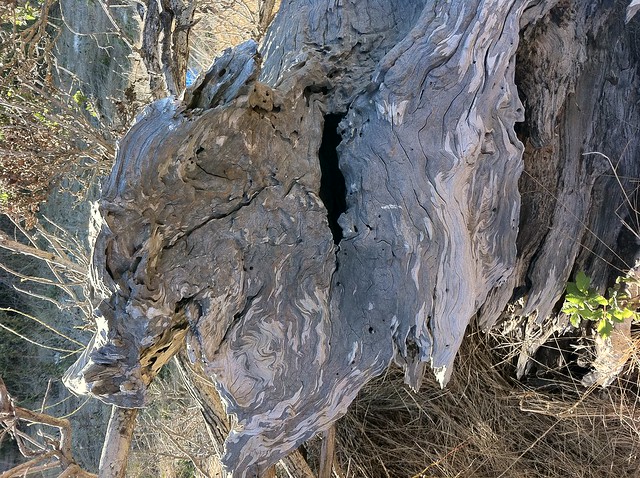
Also made some experimental photos with the new HDR setting in iOS 4.1, below.

Burl

(Click for full-size version). HDR mode doesn’t always work perfectly, but when it does, it’s amazing.

Lake Margaret

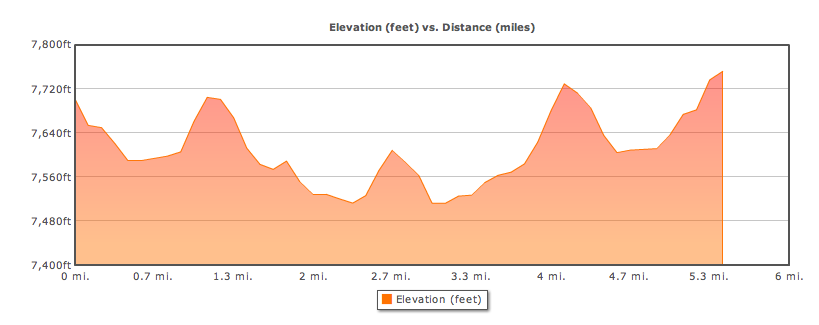
Amazing weekend in the Sierras with Miles and my parents, highlighted by a 5.4 RT hike to Lake Margaret, off Highway 88. Weather report had called for rain, but we lucked out with sunshine that morning. By the time we made it to 7,700 feet elevation, just past Kirkwood Ski Resort, the temp had dropped to 40 deg farenheit (in August!)… and I was in shorts and shirtsleeves (fortunately had a sweatshirt and pants on hand for Miles).

The hike is a non-stop visual barrage of geological awesomeness – trekking across great slabs of granite pushed clean by a passing glacier some tens of thousands of years ago. Ancient cypress and bristlecone pines windswept into impossible shapes, tarns left behind by glaciers melting in place, trees cut short by beavers, just like in cartoons. The round trip was about the same length and technical difficulty as the Kalalau trail we did in Kauai, but the mile-high-plus elevation did a number on us – you get tired a whole lot faster with the reduced oxygen.

Flickr set

Tracked down a couple of geocaches on the trip. As we approached the first, hail started to trickle down on us, and on my bare legs. Had to keep moving to stay warm. The second geocache was hanging in a tree on top of a great granite slap pushed up by forces you shudder to imagine. It was a level 4 terrain cache, and we spent a good bit of time talking about how serious it would be to get injured miles from anywhere, and what it would mean to get helicoptered out. We agreed not to do anything stupid, to move slowly, not make any hasty decisions. Miles got it. Still, halfway up to Dawg Years we decided to back out and not go any further… until we spotted the secret back way up to the lonely windswept pine that we were certain held the cache. From there on it was easy going, and I let Miles do the honors.

It only got colder on the way back, as we listened to thunder rippling across the valleys, signaling the start of rain. Incredibly lucky – we only got sprinkled on, but it started to pour buckets just after we got in the car.

Decided to see what the camera in the iPhone G4 was capable of, and took all of these images with it. Impressed overall, but they’re still not at the quality of images from the PowerShot. From now on, will continue to hike with the PowerShot, but will be stoked to have the iPhone on-hand for spontaneous quickies.

Elevation profile:

Unfortunately, the weekend ended badly, when Mom slipped on gravel heading down to Cat Creek, where we were planning to do some swimming in the melt water. I was 10′ in front of her when I heard the “oomph,” and turned around to see her ankle bent at a very wrong angle. Dad and I hoisted her back to the car, and she ended up in the E.R. She’ll have to have a plate installed, and will be laid up for quite a while. Best luck and love to both of them getting through this – a horrible thing to witness and it won’t be pleasant for the next month. Much love.

Cable Rail System

The rails on our front porch were original from 1942. Wood had rotted out, and they were flimsy and unsafe. Not to mention ugly. A few weekends ago, finally decided to rip them out and rebuild. Miles and I went after them with crowbar and saws and they were gone in 15 minutes flat. Took three weekends to rebuild completely.

Good amount of time wire brushing, sanding, puttying, sanding again, and painting. New 2x4s and vertical 4×4, this time with supporting L-brackets, and the new wood was solid as a rock. More puttying and painting (we were lucky to find paint that matched the old paint exactly).

We had seen porch rails made of stainless steel cable on a house in the neighborhood, and were going to buy their system, when we realized how expensive their connectors were. Would have cost nearly $900 in parts to do the whole project! Recalibrated and decided to DIY it with stainless cable and annules from Ace Hardware, combined with a pile of turnbuckles I had inherited from the J-School years ago – they had been used to hang one of Ken Light‘s photo installations.

Installation went pretty smoothly once I got into the rhythm of it. Install eyehook, attach one end of turnbuckle, create cable loop with annule on other end of turnbuckle, measure cable length by eyeball and attach eyehook to other end with another annule. Three hours later I was done (except for one eyehook, which hit a rotted portion of the vertical we hadn’t replaced (because it’s part of the porch structure).

Not perfect, but close enough for jazz, and spent less than $150 in parts for the whole job.

See slideshow or gallery with captions.

Batman and Robin

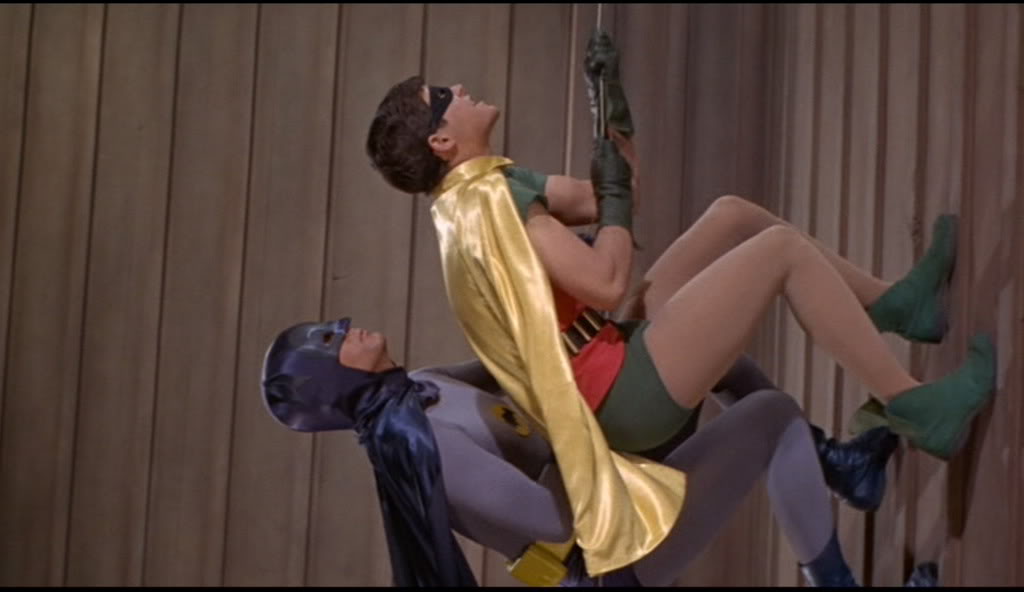
Dad used to develop film for the TV industry in Hollywood. Around the age I started watching Batman and Robin on TV, he was telling us he was having lunch with them on set. And… damn him… he told us how they climbed up buildings. Just a matter of turning the camera sideways, he said. Which totally ruined the magic of it for me and my brother. Except that it didn’t.

Batch-deleting Twitter favorites

Update: This script broke when Twitter started requiring all API interactions to use oAuth2. The script would have to be made far more complex to support this change, and I have no plans to do so. My current advice: Leave your favorites in place. They don’t hurt anything. Think of them like Facebook “Like”s – you wouldn’t try and delete those, would you?

I read Twitter primarily on the iPhone, and find tons of great links I want to read in a proper browser later on (I personally find reading most web sites on an iPhone to be more hassle than it’s worth). Perfect solution: Side-swipe an item in Tweetie and tap the star icon to mark it as a favorite. Later, visit the Favorites section at twitter.com to follow up.

Unfortunately, over the past couple of years I’ve favorited way more things than I’ll ever have time to read. As of now, I’ve got 1600 favorites waiting to be read. Ain’t never gonna happen. I declare Twitter Favorite bankruptcy! Needed a way to batch-unfavorite the whole collection, and twitter.com doesn’t provide a tool for that.

Ended up writing a script on top of the Tweepy library to get the job done:

Twitter Favorites Bankruptcy

Bristlebot

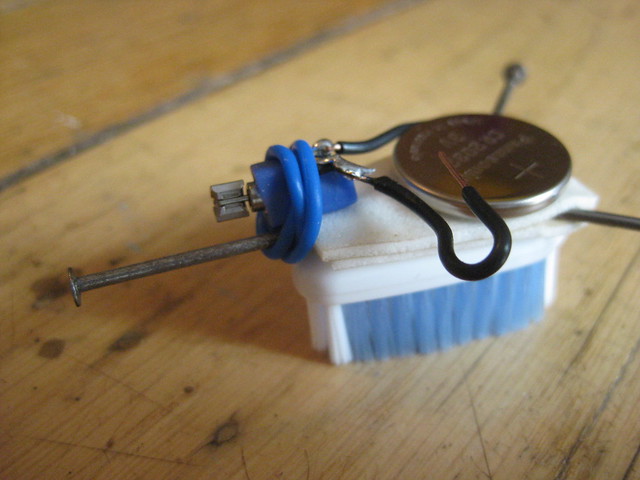
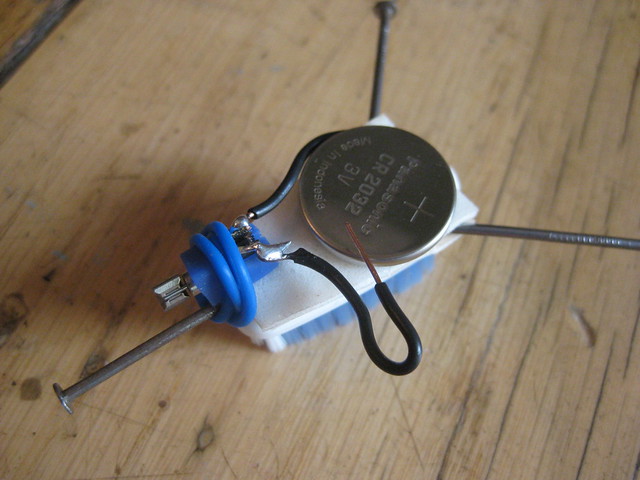
Saw instructions for a giant bristlebot in this morning’s Instructables newsletter and immediately knew I wanted to build one with Miles. Then realized the smaller versions – based on a simple toothbrush head – were even more do-able. Decided on this improved version with antennae to help it resist falls and to bounce off walls and objects.

IMG_6068

Parts needed:

  • Toothbrush head – with flat, not curved bristles
  • Button cell battery
  • Small vibrating motor from a pager or cellphone
  • Double-sided adhesive foam tape
  • Nails
  • Possibly a soldering iron

Radio Shack, unfortunately, doesn’t stock vibrating motors. Nor will they give you old/returned cell phones to pull apart to pull the vibrators out of – they’re all in a database, destined no doubt for China where they’ll be pulled apart by underpaid workers in toxic waste dumps. They did, however, give us a couple of flat batteries with a bit of charge left in them. Headed for MetroPCS to see if they’d give us an old phone to tear apart. Nope, same story. But a guy in line heard us, and offered to sell us his old one for $5. Bingo!

We were able to pull the vibrating motor out just in a few minutes. But it had no leads – I was going to have to solder some onto the two bare contacts. Hacksaw and sandpaper worked perfectly on the toothbrush head. Everything came together pretty easily per the Instructables instructions. We were amazed – our bristlebot worked WAY better than expected! Totally scoots along. Turns out the key to getting it to go straight and not in circles is to really bend those bristles back, so that they store and release energy in a forward direction.

Bristlebot

Unfortunately, not everything went exactly to plan. I plugged in the soldering iron to warm up on a high-ish shelf while Miles was in another room playing with the cell phone leftovers. I went to the garage for a couple of minutes, then heard him crying loudly — he had wandered in, seen the electrical cord, gotten curious, and picked it up just to see what it was. Got burned pretty badly on his thumb and forefinger. Long period of tears, ice, ibuprofen, burn cream, and of course, ice cream. And of me feeling like a total bad dad for not warning him about it. I assumed he wouldn’t be in that room, and assumed he wouldn’t see if it he did come in. And got bitten by my assumptions. Felt horrible for the little guy. He’s doing OK, and we had a gas playing with the bristlebot at the dinner table.