Couples Sharing Email Addresses

Doing tech support for an elementary school, I’ve recently discovered something I’d never seen in my 20 years of technology experience: There are a small percentage of couples/partners who share an email address between them, or even have a single email address for the whole family. When I first encountered this, I was sure there must be some mistake, but when I Googled for more on the phenomenon, I found other mentions of the practice.

In most cases, it seems people do this for one of two reasons:

1) People tend to see an email account like the family telephone land line, or like a shared bank account
2) One person in the couple is “not technology savvy” and it’s just easier for one person to manage the email

I have a few thoughts on this:

First, an email address is a unique identity in the modern world, not a shared bucket. Email is not like a telephone line or a shared bank account. You might receive a few calls a day on your family phone, but individuals often receive 100+ emails per day. The volume of email we all have to manage would seem to make sharing an account non-viable from a simple housekeeping perspective.

Secondly, when people write an email, they have a reasonable expectation of reaching an individual on the other end. I’m going to write an email very differently to a couple sharing an address than I would to an individual. If I don’t know in advance that it’s a shared account, that’s not fair to the writer, who naturally assumes that one email equals one person.

Thirdly, to share an email account makes it seem like two people talk with the same mouth. When I’m reading a message, I don’t have any clue who’s actually talking unless it’s personally signed at the end (and emails are often not). Again, this is frustrating for the recipient.

More importantly, we all have dozens if not hundreds of accounts on systems all over the web today. From Facebook to our online banking to stores to school intranets to reading clubs, many if not most of these systems tie accounts to email addresses. If two people share an email account, then many systems cannot manage their individual identities. Let’s take the example of a school intranet that tracks things like contact information, family jobs, individual board positions, photographs, etc. It may also be the case that that system sends email to individuals that have certain responsibilities in the school. The school can reasonably expect that people who are privileged to see that mail are not sharing those private messages with others. It’s reasonable to expect that each parent in that school has their own email address.

Finally, there’s basic privacy / politeness. I’m curious – if you share an email account, do you also open one another’s paper mail?

How To Create Individual Email Accounts

It’s trivially easy for each member of a family to have their own email account, and the basic expectations of privacy that go along with it.

The best/easiest way is simply to create free accounts at webmail providers like gmail.com or mail.yahoo.com or similar. Then all you have to do is log the browser into one account or the other.

If you prefer to use email on your ISP’s domain (such as comcast.net or pacbell.net), be aware that almost all ISPs let you create lots of email accounts for no additional charge. Just log in to their site and find their Mail Help center. However, you’ll have a much better experience on GMail than you will on your ISP’s mail system – there really is no good reason to use an email address attached to your ISP. What happens when you switch to another ISP? You don’t want your email to have to change along with it!

If you prefer to use a desktop email client on Mac or Windows like Apple Mail, Entourage, Outlook, Thunderbird etc., you’ll want to have multiple logins on that desktop computer. That way each family member has their own desktop, their own documents, their own bookmarks, their own email, etc. If you’re not doing that already, take the time to give every family member their own login, then set up your desktop mail accounts from within those respective logins.

Digital Literacy

Managing an email account is the cornerstone of basic digital literacy in the modern world. Not to be brusque, but that partner who is “not technologically savvy” needs to at least rise to the level of being able to send and receive email. An adult not being able to do email in 2011 is excluding themselves from the modern world in a way that just doesn’t / can’t work any more. If you want to go all the way off the grid, OK, but if you’re going to live in modern society, you need to be able to do your email, period.

Anti-Gravity Research Water Bottle Rocket

On recommendation of a co-worker, recently ordered the Skylab Water Rocket kit from Anti-Gravity Research. Got around to assembling it on a beautiful June day, accompanied by Miles and one of his friends. Downloadable instructions were super detailed with great pictures. Hardest part, of course, was finding a 2-liter pop bottle (who goes through that much soda, anyway?) I took a nip, and the rest went down the drain. The rest of the build was straightforward – snip off the retainer ring near the neck, attach the bumper with rubber bands (included), assemble the fins, and attach the guide tube (which slides over a stick to ensure a true vertical launch).

The included fins were really my only complaint about the kit – they’re finicky to put together, and they pop off on impact with every flight. Covered in soapy water, they get slippery, which makes putting them back together even more of a noodle. Have written the company asking why they don’t do a one-piece fin assembly.

Put about 1/2″ of “fuel” (water with 10% dishwashing soap for an extra fizzy vapor trail) into the bottle, attach the high-thrust bottle cap adapter, slip on the fin assembly, and insert the air pressure nozzle. For safety, the kit comes with a 20-foot connector hose, which runs to an ordinary bicycle pump. Start jacking! Immediately, the soapy water creates a foam visible inside the bottle. A few strokes later, the bottle is bulging with pressurized foam.

Anti Gravity Research water rocket from Scot Hacker on Vimeo.

Pardon the bouncing camera as I was pumping with one hand and shooting with the other. Feel the expectation in the air? Love the kids’ commentary.

It’s impossible to know exactly when it’s going to go off – basically whenever the pressure-fit nozzle can no longer withstand the pressure of the foam. But when it does, holy mother of pearl! If I had to guess, I’d say the rocket flew between 100 and 125 straight into the air, majestic!

The 8-year-olds I was with weren’t able to pump hard enough to get it going so that remained a grown up job, but they were fully involved in the rest of the process, and love love loved it.

Recommended.

Update: I corresponded with Ken at Anti-Gravity, who saw this post and responded:

You estimated that the rocket had flown 100 to 125 feet up. If you pump quickly, the rocket will usually keep hanging on until about 60 or 70 pumps, and if the rocket has enough water in it (at these higher pressures it can carry up much more water without tipping over) the rocket can reach 400 feet altitude or more. In our development tests, using a high-strength bottle, the SkyLab has reached an altitude of 570 feet.

Yow!

Venus Fly Trap

Miles:

Do you think a venus fly trap has a brain? Plants are weird. How can anything grow that doesn’t have a brain? It’s as weird as the mystery of where the universe ends. My favorite god is the god of food. If you want to befriend the god of food you have to give him some food. The god of disgustingness wants some brain juice or a booger. The god of technology wants an oversized solar powered laptop.

A Guide to Twitter for Facebook Users

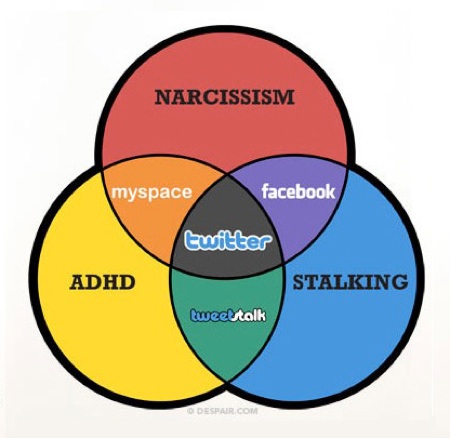
Some of my Facebook friends have been asking why I seem to spend more time on Twitter than on FB, and wonder what I see in it. I’ve started to realize that a lot of Facebook users kind of misunderstand Twitter, and don’t realize how much value is there. The two networks represent very different kinds of parties, and it’s not like you have to choose one or the other – you get very different things from each of them. I can’t imagine not doing both!

Finally decided to put together this little guide to clarify a few things. Hope you find it useful!


Image via Boing-Boing
Continue reading “A Guide to Twitter for Facebook Users”

Maker Faire 2011

Bird of Broken Toys Miles and I have attended Maker Faire in San Mateo every May since it started five years ago. It’s gotten huger with every passing year of course – wall to wall people, and tricky driving/parking if you don’t arrive first thing. A lot of the same themes from year to year, but always something new to feast the eyes and tease the brain. Didn’t stay as long this year, didn’t dig as deep, and didn’t get as many diggable photos as we have in the past, but still glad we went and will keep on keeping on!

Strangely, one of the best moments of the day had nothing to do with welding or LEDs or Adam Savage. It was a magical encounter with a lone man sitting at a small typewriter (yes, typewriter), selling poems. “You name the topic, you name the price.” With a friend’s 50th birthday coming up that night, I asked him to improvise on the topic of “bicycles in the city of your mind.” We carried on a conversation about French surrealist Alfred Jarry and his impact a hundred years later on the punk/new wave movement, and about how Picasso actually bought his gun after he passed, and ended with me spontaneously ejecting the sentence “This moment is a grommet through which the aglet of morning has finally emerged.” We laughed, he handed me the finished poem, and it was absolutely fantastic (sorry, I already gave it away as a gift, so can’t share it here). More at zachhouston.com.

Flickr set

My Drunk Kitchen

At the Knight Digital Media Center where I work, we depend on interns and assistants to accomplish a lot of what we do. We’ve had a lot of good ones over the years, but one of the best was Hannah Hart, aka Harto. Unfortunately for us, Hannah moved to NYC to become an assistant to one of the actors on 30 Rock… and to turn herself practically overnight into a minor celeb as host of her own YouTube channel, where she’s been working on the net-only cooking show My Drunk Kitchen.

MDK is recorded on a single MacBook webcam from her kitchen apartment while demonstrating cooking techniques for complicated “meals” like grilled cheese sandwiches and cookies – while getting completely and totally crocked on cheap champagne, wine, or whatever happens to be sitting around that day. Sound insane? Just you watch. It’s all about the repartee’.

Each episode starts off innocently enough, but by the time the prep is done, Hannah’s pretty much off her rocker, questioning whether anyone really knows what it means to “cream the butter” (“I’m sure they meant ‘cram’ – I’ll just cram the butter in here…”).

Hannah’s just launched her own web site, featuring all MDK episodes to date.

Content Farms and the Demand Media Cesspool

Never mind black-hat SEO and the mostly closed ecosystem of the second internet (Facebook) – the web is facing a possibly even bigger nemesis in “content farms” like Demand Media, which attempt to game the search + advertising money machine that is Google. I knew that content farms were a big problem (Google even recently released a Chrome plugin that would let end users identify non-useful content on the internet so it could be deprecated in search results). But check out the infographic below. It’s all interesting, but wrap your head around the the raw numbers: “Demand’s goal is to publish 1 million articles/month (30,000 articles per day)” — all crap content written by underpaid writers churning out intentional baloney, all with the intention of skimming pennies and dollars out of AdWords. In the process, they’re wrecking the quality of the search results you rely on every day, and filling the web with bile and nonsense. Staggering.

Demand Media Breaking the Bank
[Source: OnlineMBA.com]

Looking Back on ZiffNet: 20 Years in Technology Publishing

Social networking and online publishing weren’t always about the web. When I got my start at ZiffNet – an umbrella organization for the family of Ziff-Davis computing magazines – “online” meant CompuServe, Prodigy, and AOL. At the time, CompuServe was only accessible in command line mode, through terminal emulation software. Seems impossible by today’s standards, but at the time, it was the state of the art. The Ziff-Davis presence on Prodigy and AOL came a bit later, and were graphical – some of the first to take advantage of the then-new new Windows operating system.

We were lucky to have been in the cat bird’s seat when the web hit in the early ’90s (though we were also blind-sided by it, since our business model was all about charging for connection times). I was lucky to have been there at the birth of the web, and got to help create Ziff’s first web presence, which in turn inspired me to launch Birdhouse (first as an arts collective, then later as a blog, and later as a hosting service).

A lot of water under the bridge since then – incredible to contemplate how the landscape of online publishing has changed since then. To celebrate the 20th anniversary of ZiffNet, ZDNet has published a ZDNet 20th Anniversary Special, with memoirs from myself and others involved at the time. ZiffNet launched my passion for technology and my career. I’ve re-posted my own contribution below, for posterity.

See also: Photo gallery: ZDNet through the years, 1997-2010 as well as Michael Kolowich’s recollection of the start of Interchange – a service that was designed to blow the doors off the online services of the time, but that was eclipsed by the birth of the web: ZiffNet: ‘Project Athena’ and the moment of conception.

Continue reading “Looking Back on ZiffNet: 20 Years in Technology Publishing”

Migrating from Django-Tagging to Taggit

When Bucketlist launched a year ago and I needed a good app to let users create a taxonomy for their life goals, django-tagging was the main contender, and that’s what we went with.

Django-tagging worked pretty well overall, but had one critical bug: Because it only had a tag “name” field but no slug field, users could enter tags with slashes in them. Accessing lists of those tags would then generate a 500 error – a bad user experience, unclean, and I was getting tired of seeing the error reports. Unfortunately, django-tagging hasn’t been been updated in quite a while – starting to look like abandon-ware.

At Djangocon 2010, buzz was that Alex Gaynor’s django-taggit was picking up the slack and becoming the go-to tagging library for Django. Unfortunately, Taggit provides no migration strategy to move your existing tag base over. I held off on migration hoping one would appear, then finally decided this week to try it myself. Thought I’d document the process for others in the same boat.
Continue reading “Migrating from Django-Tagging to Taggit”