Building mod_wsgi with EasyApache for WHM/cPanel

Note: These instructions are for root owners of WHM/cPanel systems, not end users.

If you want to run Django sites on a cPanel server, you’ll probably want to use the mod_wsgi Apache module. There are plenty of instructions out there on compiling mod_wsgi, but if you create it outside of the cPanel system, mod_wsgi.so will vanish each time you run easy_apache to upgrade your apache and php.

The key is to install this mod_wsgi for cPanel module. But before you go there, you’re going to want a more recent version of Python installed, since RedHat and CentOS still ship with Python 2.4, which will be deprecated by Django soon. However, you can’t overwrite the system-provided Python because yum and Mailman depend on it.

Download Python 2.7 (or whatever the latest is) into /usr/local/src. It’s critical that you build Python with shared libraries enabled, since mod_wsgi will be wanting to use them. So unpack the Python archive and cd into it, then:

./configure --enable-shared
make install

You’ll get a new build of python in /usr/local/bin, without disrupting the native version in /usr/bin. Any user wanting python2.7 to be their default can add this to their .bash_profile:

PATH=/usr/local/bin:$PATH:$HOME/bin

You’ll also get new libpython shared objects in /usr/local/lib. When you go to build mod_wsgi, easy_apache will need to look for python libs in that location. I found that copying the libs into standard library locations such as /lib and /usr/lib as suggested here didn’t do the trick. What did work was to add a system configuration file pointing to the new libs. Do this:

cd /etc/ld.so.conf.d
echo "/usr/local/lib/" > python27.conf
ldconfig

Now you’re ready to build mod_wsgi through easy_apache. Download custom_opt_mod-mod_wsgi.tar.gz from this ticket at google code and run:

tar -C /var/cpanel/easy/apache/custom_opt_mods -xzf custom_opt_mod-mod_wsgi.tar.gz

That unpacks the module into the right location so that easy_apache will find it and present it as a build option. Run easy_apache as usual (either via script or through WHM) and select the mod_wsgi option. When complete, you’ll find mod_wsgi.so along with all your other modules in /usr/local/apache/modules. The best part is, this will now become part of the default easy_apache build process, so Django sites won’t break when you rebuild apache+php in the future.

Many thanks to challgren for creating the module and to Graham Dumpleton for all of his mod_wsgi evangelism and support.

Ten Reasons I Prefer Google+ Over Facebook

As if managing Facebook and Twitter wasn’t nuts enough, I’m now totally hooked on Google+. The sooner all my friends migrate from Facebook to G+, the better. Not that I expect that actually to happen, but I wouldn’t mind :) I’ve always preferred Twitter over Facebook because of its public nature (a well-curated Twitter firehose has a much higher information quotient than a Facebook stream), but Google+ cranks that equation up a notch by giving you the perfect combination of public and private, without Twitter’s character limitations. In a nutshell:

  1. Posts don’t get cut off after 420 characters like they do on FB, forcing you to add the rest of your post as comments.
  2. You can actually edit posts and comments after they’ve been made, so you don’t have to delete and repost.
  3. You can actually use bold and italics (imagine that!)
  4. Cleaner design.
  5. The Circles concept gives you way more control over who sees your content. You can be as public or as private as you want to be. Share with the world or just one person or any subset thereof.
  6. You actually own your own data – you can export your entire history of content, and all of your contacts – to back it up take it elsewhere if you ever want to (FB shuts down all attempts to do that).
  7. Perfect combination of the privateness of FB with the publicness of Twitter, so you get exposed to a much broader range of content than you do on FB.
  8. No Farmville!
  9. No ads (yet)
  10. Great collaboration tools (Huddles, Hangouts), great suggested reading (Sparks).
  11. Animated GIF support (no really, it’s cooler than you think – click through)

Oops, that was eleven. Want an invite? I’ve got 150 to pass around. Have a mint, they’re free!

Couples Sharing Email Addresses

Doing tech support for an elementary school, I’ve recently discovered something I’d never seen in my 20 years of technology experience: There are a small percentage of couples/partners who share an email address between them, or even have a single email address for the whole family. When I first encountered this, I was sure there must be some mistake, but when I Googled for more on the phenomenon, I found other mentions of the practice.

In most cases, it seems people do this for one of two reasons:

1) People tend to see an email account like the family telephone land line, or like a shared bank account
2) One person in the couple is “not technology savvy” and it’s just easier for one person to manage the email

I have a few thoughts on this:

First, an email address is a unique identity in the modern world, not a shared bucket. Email is not like a telephone line or a shared bank account. You might receive a few calls a day on your family phone, but individuals often receive 100+ emails per day. The volume of email we all have to manage would seem to make sharing an account non-viable from a simple housekeeping perspective.

Secondly, when people write an email, they have a reasonable expectation of reaching an individual on the other end. I’m going to write an email very differently to a couple sharing an address than I would to an individual. If I don’t know in advance that it’s a shared account, that’s not fair to the writer, who naturally assumes that one email equals one person.

Thirdly, to share an email account makes it seem like two people talk with the same mouth. When I’m reading a message, I don’t have any clue who’s actually talking unless it’s personally signed at the end (and emails are often not). Again, this is frustrating for the recipient.

More importantly, we all have dozens if not hundreds of accounts on systems all over the web today. From Facebook to our online banking to stores to school intranets to reading clubs, many if not most of these systems tie accounts to email addresses. If two people share an email account, then many systems cannot manage their individual identities. Let’s take the example of a school intranet that tracks things like contact information, family jobs, individual board positions, photographs, etc. It may also be the case that that system sends email to individuals that have certain responsibilities in the school. The school can reasonably expect that people who are privileged to see that mail are not sharing those private messages with others. It’s reasonable to expect that each parent in that school has their own email address.

Finally, there’s basic privacy / politeness. I’m curious – if you share an email account, do you also open one another’s paper mail?

How To Create Individual Email Accounts

It’s trivially easy for each member of a family to have their own email account, and the basic expectations of privacy that go along with it.

The best/easiest way is simply to create free accounts at webmail providers like gmail.com or mail.yahoo.com or similar. Then all you have to do is log the browser into one account or the other.

If you prefer to use email on your ISP’s domain (such as comcast.net or pacbell.net), be aware that almost all ISPs let you create lots of email accounts for no additional charge. Just log in to their site and find their Mail Help center. However, you’ll have a much better experience on GMail than you will on your ISP’s mail system – there really is no good reason to use an email address attached to your ISP. What happens when you switch to another ISP? You don’t want your email to have to change along with it!

If you prefer to use a desktop email client on Mac or Windows like Apple Mail, Entourage, Outlook, Thunderbird etc., you’ll want to have multiple logins on that desktop computer. That way each family member has their own desktop, their own documents, their own bookmarks, their own email, etc. If you’re not doing that already, take the time to give every family member their own login, then set up your desktop mail accounts from within those respective logins.

Digital Literacy

Managing an email account is the cornerstone of basic digital literacy in the modern world. Not to be brusque, but that partner who is “not technologically savvy” needs to at least rise to the level of being able to send and receive email. An adult not being able to do email in 2011 is excluding themselves from the modern world in a way that just doesn’t / can’t work any more. If you want to go all the way off the grid, OK, but if you’re going to live in modern society, you need to be able to do your email, period.

Looking Back on ZiffNet: 20 Years in Technology Publishing

Social networking and online publishing weren’t always about the web. When I got my start at ZiffNet – an umbrella organization for the family of Ziff-Davis computing magazines – “online” meant CompuServe, Prodigy, and AOL. At the time, CompuServe was only accessible in command line mode, through terminal emulation software. Seems impossible by today’s standards, but at the time, it was the state of the art. The Ziff-Davis presence on Prodigy and AOL came a bit later, and were graphical – some of the first to take advantage of the then-new new Windows operating system.

We were lucky to have been in the cat bird’s seat when the web hit in the early ’90s (though we were also blind-sided by it, since our business model was all about charging for connection times). I was lucky to have been there at the birth of the web, and got to help create Ziff’s first web presence, which in turn inspired me to launch Birdhouse (first as an arts collective, then later as a blog, and later as a hosting service).

A lot of water under the bridge since then – incredible to contemplate how the landscape of online publishing has changed since then. To celebrate the 20th anniversary of ZiffNet, ZDNet has published a ZDNet 20th Anniversary Special, with memoirs from myself and others involved at the time. ZiffNet launched my passion for technology and my career. I’ve re-posted my own contribution below, for posterity.

See also: Photo gallery: ZDNet through the years, 1997-2010 as well as Michael Kolowich’s recollection of the start of Interchange – a service that was designed to blow the doors off the online services of the time, but that was eclipsed by the birth of the web: ZiffNet: ‘Project Athena’ and the moment of conception.

Continue reading “Looking Back on ZiffNet: 20 Years in Technology Publishing”

Migrating from Django-Tagging to Taggit

When Bucketlist launched a year ago and I needed a good app to let users create a taxonomy for their life goals, django-tagging was the main contender, and that’s what we went with.

Django-tagging worked pretty well overall, but had one critical bug: Because it only had a tag “name” field but no slug field, users could enter tags with slashes in them. Accessing lists of those tags would then generate a 500 error – a bad user experience, unclean, and I was getting tired of seeing the error reports. Unfortunately, django-tagging hasn’t been been updated in quite a while – starting to look like abandon-ware.

At Djangocon 2010, buzz was that Alex Gaynor’s django-taggit was picking up the slack and becoming the go-to tagging library for Django. Unfortunately, Taggit provides no migration strategy to move your existing tag base over. I held off on migration hoping one would appear, then finally decided this week to try it myself. Thought I’d document the process for others in the same boat.
Continue reading “Migrating from Django-Tagging to Taggit”

Bristlebots in the Classroom

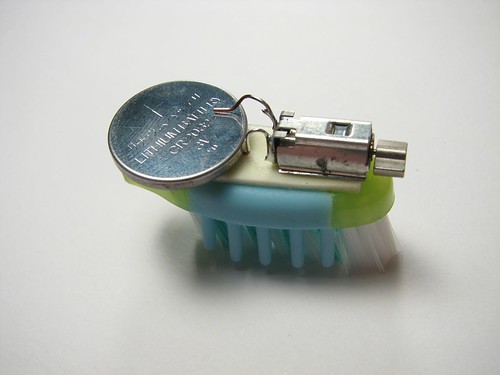
A year ago, Miles and I made our first Bristlebot – a small robot made from a toothbrush head, hearing aid battery, and the vibrating motor from a cell phone – which skitters around on flat surfaces in chaotic patterns.

Enterprise

The experiment didn’t end well – Miles grabbed a hot soldering iron by the shaft when I wasn’t looking and we had to segue into burn control. When that subsided, we had great fun racing the bot across the floor.

I just volunteered to help his entire second/third grade classroom build their own bristlebots this April. We’ll also try a variant with mint tins and paper clip legs. We plan to build a “sumo” ring they can push each other out of, and may also try our hand at bristlebot painting:

Chris Cerrito’s Vibrobots on Paint from Anderson Miller on Vimeo.

Found a good source for a battery + motor combo pack, which I’ll be ordering in bulk. Now just need to get my hands on a lot of toothbrushes!

Loose Notes, SXSW 2011

Keyboard Cat Three Wolf Moon Lightning Eyes Enjoying my sixth annual pilgrimage to Austin, TX for South by Southwest Interactive, 2011. Once again, I’m renting a bike from Barton Springs Bikes – fantastic way to get around, especially now that the conference is much larger and more spread out. It actually makes it feasible to attend sessions 10 blocks away, given the 30 minute break between sessions. Unfortunately, the excellent mountain bike they gave me was stolen from in front of the hotel on Saturday night – cable lock clipped. They cheerfully delivered a replacement bike to me later the same day. Since my hotel is right on the river, I’ve got the luxury of riding all the way to the convention center along Ladybird Lake (which is actually a reservoir that “flows” through town). Weather was high-70s/low-80s all week – shorts weather in March, so lovely!

As soon as I arrived, rented a kayak and spent a couple of hours boating around on the “lake.” Next day, had a few hours before sessions started and went bicycle geocaching along the water. Frabjous day! You’ll find my photos on Flickr or by following @shacker on Instagram.

Ate lots of great Texas BBQ and TexMex (thanks Chuy’s, Stubbs, and IronWorks). Didn’t do a lot of partying, but did manage to squeeze in a visit to the Museum of the Weird, where I got to see a woman drive a 30-penny nail straight into her nose (a move called “The Blockhead”). And of course my annual pilgrimage to Tears of Joy hot sauce shop – had another box of excellent sauces shipped home. Was treated to an evening of hilarious comedy with John Oliver of the Daily Show (and four others, each more funny than the last). Met tons of cool people, got my brain filled with inspirational and challenging new ideas, and ran myself ragged. Halfway through, gave up trying to stay caught up with email or anything going on back home, though we were very much aware of the earthquake/tsunami disaster going on in Japan – it was very strange to try and stay focused on the conference while that was happening. The enormity of it is still sinking in. There were many disaster-relief fundraising efforts going on during the conference, and SXSW did what it could to pull together and help.

Spent most of the week attending dozens of sessions on interactive media and taking notes, which I’ve posted here as “Loose Notes” and have tagged here at Birdhouse under #sxsw2011 (though that link won’t get you to all of them – pagination is currently broken, sorry). While every session had something useful to offer, some are obviously better than others. If I had to pick a favorite, I’d give the honors to Jeff Jarvis’ amazing talk Let’s Get Naked: Benefits Of Publicness V. Privacy, which crystallized a lot of the thoughts I’ve had on the public vs. the private vs. semi-private web over the past year. The other big one for me was Jane McGonagil’s talk Reality is Broken: Why Games Make Us Better, which challenged a lot of my notions about the effect of gaming on kids’ minds, and its potential benefits to education and to improving the world. Truly inspirational.

As for hands-on sessions, the most inspirational/useful was Creative JavaScript and HTML(5) Visual Effects – a double-long session that gave us a great hands-on intro to doing particle animation, movement, shading, and WebGL in the HTML5 canvas tag. That’s not to detract from any of the other sessions – check the links below for lots of juicy stuff.

If I had one complaint about the conference organization, it would be the fact that it was so spread out. In part, this was necessary, since there were more than 19,000 attendees this year – more than could fit in a single convention center. But the trek to some of the remote hotels was a barrier for many people. In addition, it ghettoized some topics unnecessarily. For example, all of the Future of Journalism sessions were at the Sheraton, 10 blocks away from the Convention Center. If anyone could benefit from being mixed in with all of the geeks, it’s journalists. I get why multiple venues are needed, but would have liked to have seen the topics mixed up across venues, not split up.

A handful of misc images taken from in and around Austin throughout the week:

To view larger, or with full captions, check out the Flickr set.

Complete list of Loose Notes from SXSW 2011:

Keynote: Blake Mycoskie of Tom’s Shoes

Loose notes from the SXSW 20011 Keynote: Blake Mycoskie

In this visionary talk, Blake Mycoskie shows you how to succeed in a new era of relentless competition and heightened social awareness. Why is philanthropy your best competitive advantage? How do you make money and do good simultaneously? How are the two acts intertwined? At TOMS — a self-sustaining, for-profit company — the act of giving is the cornerstone of its business model, integral to its financial success. In a behind-the-scenes look at how it all works, Mycoskie shares counterintuitive ideas (“In tough times, give more!”) that you can apply to your own business. His bold, winning strategies are proven, and have been talked about by Bill Clinton, the Obama administration, and the hundreds of thousands of customers that have joined the TOMS Movement by buying a pair of shoes. Inspired, inspiring and most of all practical, Mycoskie presents a new direction for business, offering TOMS as his prime case study. After hearing him speak, you too will know why giving just makes sense.

Continue reading “Keynote: Blake Mycoskie of Tom’s Shoes”

Adobe’s Tooling for jQuery and the Mobile Web

Loose notes from SXSW 2011: Adobe’s Tooling for jQuery and the Mobile Web

Dreamweaver used to be criticized for “black box” code management. Adobe made great strides in improving the situation and keeping code hand-editable. But as the web becomes more complex and we need to deal with more technologies and target more screen sizes, the need for a system to manage a complex code base becomes greater. Dreamweaver has evolved to meet the challenge. I only stayed for the first half of the session.
Continue reading “Adobe’s Tooling for jQuery and the Mobile Web”

Hacking RSS: Filtering & Processing Obscene Amounts of Information

Loose notes from SXSW 2011 session Hacking RSS: Filtering & Processing Obscene Amounts of Information

Information overload is less about having too much information and more about not having the right tools and techniques to filter and process information to find the pieces that are most relevant for you. This presentation will focus on showing you a variety of tips and techniques to get you started down the path of looking at RSS feeds in a completely different light. The default RSS feeds generated by your favorite blog or website are just a starting point waiting to be hacked and manipulated to serve your needs. Most people read RSS feeds, but few people take the time to go one step further to hack on those RSS feeds to find only the most interesting posts. I combine tools like Yahoo Pipes, BackTweets, PostRank and more with some simple API calls to be able to find what I need while automatically discarding the rest. You start with one or more RSS feeds and then feed those results into other services to gather more information that can be used to further filter or process the results. This process is easier than it sounds once you learn a few simple tools and techniques, and no “real” programming experience is required to get started. This session will show you some tips and tricks to get you started down the path of hacking your RSS feeds.

Continue reading “Hacking RSS: Filtering & Processing Obscene Amounts of Information”