Multi-Flash Photo Illustrations

Tech-Ill-Car A digital camera with four flash units takes four images, each with slightly different shadow boundaries. These boundaries can then be used to compute the outlines of objects. What comes out of the camera is essentially an outline of the object, which can then be overlayed on the original photo in Photoshop. In less than a minute you have an illustration based on photo-reality. A few samples. Shown here, an engine block, the original photo of which looked murky and indistinct, now informative.

So imagine a journalist in the field covering a story s/he thinks is going to need an illustration, rather than a photo. With one of these cameras, they could shoot an illustration on the spot and file it from the field, rather than commissioning it from the pub’s art dept.

Peter Norton: Off My A-List

There are two kinds of pop-ups: The evil kind, which spawn unrequested when a page loads, and the relatively benign kind, which appear when requested (by clicking a JavaScript link). Virtually all browser-based pop-up blockers are able to distinguish between the two, so that sites that use pop-ups without devilish intent continue to work properly.

Over the past week, I’ve been getting email from a small handful of students informing me that the J-School’s course schedule was appearing as a blank window. Could not reproduce the behavior on any OS/browser.

Finally a student lent me her laptop, and sure enough, blank page. Viewed source and was horrified to find JavaScript in the page that I had not put there. Turns out she was running Norton Internet Security, which works as a sort of proxy server on the client, and literally rewrites web pages before they get to the browser, stripping page control from the developer. With NIS “Ad Blocking” enabled, the program is unable to distinguish between evil and benign pop-up code, and assumes the user would rather not see the page at all.

Had to order a copy of this POS today just so I can get started on work-arounds. Between this and recent discoveries of incompatibilities between Norton AntiVirus and both Final Cut and Pro Tools, am forced to the conclude that Peter Norton is no longer my hero.

Music: Graham Central Station :: It Ain’t No Fun To Me

Money’s Worth

After more than a decade of hard-core devotion, mneptok is starting to question his Mac allegiance. Yep, Linux just keeps getting better as a desktop OS, and yes, you can save money on hardware, but I’m not about to give up iTunes, FinalCut, or Entourage. We pay a premium to use Macs, and IMO, we get much more than our money’s worth.

Music: The Fiery Furnaces :: Blueberry Boat

Eyetrack III

eyemovement

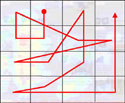
This is a map of how you read a web page. Not you you, but the aggregate “you.” Eyetrack originally started as an attempt to scientifically determine how people read newspapers, and worked by attaching a motion-sensitive device to people’s heads. Updated versions of the study track people’s eye movements as they read web sites by focusing lasers on their eyeballs.

The test equipment is able to draw visual paths showing actual eye movement, and there are some interesting surprises. People don’t scan up and down, or left to right. They start in the upper left corner and hover there for a while, looking for the most important information, then sort of zig-zag up and down, back and forth over the page, finishing in the upper right.
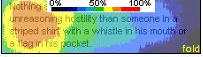
blurbthirdOf interest to both editors and designers: As people zig-zag, they don’t take in complete sentences, or even complete headlines; generally only the first few words of a headline are read before moving on. This heatmap is an aggregate view of how multiple test subjects focused on a blurb, the eye hovering primarily at the left side.

More potential surprises: Smaller type is more likely than large type to draw people into stories. If a headline is much larger than the blurb it accompanies, the blurb won’t get read — the headline is interpreted as self-sufficient. Underlined links and horizontal rules serve as barriers that discourage people from taking in the content directly below them. People do read “below the fold,” but scan content lower on the page very quickly, giving even less time to headlines and blurbs.

The power of images? People actually focus on text before images when both are present (although other studies contradict this). People often try to click on images, even when they’re not clickable. Bold-faced paragraphs leading into article bodies do get read.

No surprise: People ignore ads, and if they do see them, ads get about 0.5-1.5 seconds of attention per. Big ads are “seen” more than small ads.


Music: King Smiley :: Tipatone

Solaris 9

Now in the 2nd week of a Unix Systems Administration class, working toward my certification. This section is 10 full Saturdays in a row. Installing Solaris on x86 last week was a bust — hardware compatibility problems throughout the lab. But issues were worked out for today’s session, and we’re up and running. Installed gcc and started adding utilities, both from packages and from source, started customizing the environment. Not too different from working in OS X, BeOS, or Linux, but good to get hands-on Solaris experience, and there’s always so much more to learn. Half lecture and half lab. The sessions fly, packed with info, juicy bits and real-world sysadmin anecdotes.

Music: Vincent Gallo :: Cracks

MIME Vexation

OK geeks, help me out, for I am vexed.

FireFox 1 is out, and it’s great. In FireFox tradition, it’s very strict about web standards. I like that. But it also means that if a server sends a particular MIME type for a file, the browser handles it as such. Most browsers ignore the MIME type for .css files, and just handle them. But if FireFox hears from the server that a .css file has a type of text/plain rather than text/css, it will refuse to render it, and you’ll see the complaint in its console.
Continue reading “MIME Vexation”

Where’s the MT of the Wiki World?

Over at my O’Reilly blog: A few months ago, one of the instructors I work with asked me to attach a wiki to his class’ website. I’d been meaning to start testing various wiki systems for a while, and this was the perfect opportunity to dig in.

Short story: The wiki world desperately needs a product with the kind of vision, direction, and momentum of Movable Type. There are mezzo-mezzo wiki packages out there, but nothing I’ve seen yet that really nails the category the way MT does for blogs.

More…

Music: David Thomas & the Pedestrians :: Confuse Did

Notes on Griffin PowerMate

Received a birthday gift from baald and Col a few nights ago — a Griffin PowerMate. I’ve lusted after this tech objet d’art et function ever since they came out, but had never gotten around to trying one out. In a nutshell, the PowerMate is a USB-connected dial for your Mac. An assist for controlling system or application volume, scrolling web pages, emails, documents, scrubbing video or audio, etc.
Continue reading “Notes on Griffin PowerMate”

GMail Shuns IE

Whoa – discovered by accident tonight that GMail’s browser requirements for the Mac specify Safari, Firefox, and the Mozilla variants. Try to visit the site with Internet Explorer/Mac and you get a warning:

Gmail does not currently support your browser.

However it does let you try to sign in anway. Do so, and you get another message:

Your browser seems to be Internet Explorer, and ActiveX seems to be disabled. Gmail requires ActiveX to be enabled in order to operate.

Obviously it doesn’t require ActiveX, since it works just fine with Safari and the Mozilla cousins. So is this a case of identity crisis, or of Google make subtle stabs at MS in preparation for the coming Viking battle? Probably none of the above – they just decided not to support a dying browser on the Mac, but didn’t implement their non-support very well. Still, it’s nice to see the shoe on the other foot for a change, even if in an insignificant way.

Music: Gong :: I Niver Glid Before

Making Google Forget

How hard is it to get Google to forget a page it once knew well? I’m finding out the hard way.

A professor approached me and explained that a two-year-old student story on our site contained verfiably incorrect information — originally supplied to the student by the D.A. The story incorrectly labeled a person as a pedophile. Today, that person is in prison for totally unrelated reasons. And in prison, being tagged as a pedophile can bring serious consequences from other inmates. The prof was worried that an inmate might find the story and go ape on the guy.

I immediately removed the story from our site. Then we realized that Google was holding onto the cached version. Finding info about cache removal on Google’s site was tricky. You have to sign up for a special account (my existing GMail acct was not sufficient). I received a confirmation email, clicked the link in it as instructed, and was told my account could not be found, even though it had just been created. Thinking maybe they needed database sync time, I waited a day. Still no dice. Correspondence with Google on the matter took about one day per reply. Finally they suggested I create a new account. I did.

This time, when I clicked the link to confirm the account, I was taken to a page on Google’s servers written entirely in Chinese. Again, began correspondence with them on the problem. They had no good answers, seemed mystified. After more experimentation on my part, discovered that the page only appeared in Chinese in some browsers — freaky deaky.

Finally I was able to confirm the account and request cache removal. The process was easy, and I was instructed to wait up to 24 hours for the cached page to be removed. That was Oct. 7. Today is the 12th, and the cached version is still up. A man’s fate potentially hangs in the balance. And I’m again waiting for a response from Google.

Music: Robert Wyatt :: Maryan