Coding for Pleasure: Developing Killer Spare-Time Apps

Loose notes from the SXSW 2010 session Coding for Pleasure: Developing Killer Spare-Time Apps, hosted by :

Gina Trapani of Lifehacker and now author of Google Wave book. Also made BetterGmail and ThinkTank;
Matt Haughey – Fuelly – public social miles per gallon site, also creator of MetaFilter (now a 4-employee corporation); Adam Pash – MixTape.me (playlist/music sharing site). Also Belvedere and Texter.
Continue reading “Coding for Pleasure: Developing Killer Spare-Time Apps”

Is WordPress Killing Web Design?

Loose notes from SXSW 2010 session: Is WordPress Killing Web Design

Good question – I’ve been asking myself this lately. Unfortunately the session quickly devolved into a lot of platitudes and stating of the obvious. Yes, design has been commoditized and is no longer an “elite” activity. Yes, your site is as creative as you make it, it has nothing to do with the CMS you use. All pretty much goes without saying. Took notes for half an hour, then headed to the HTML5 discussion… which was full and not allowing more people in.
Continue reading “Is WordPress Killing Web Design?”

zip vs. tar + gzip

Just had the need to create an archive of a folder containing 91 large text files, totaling 370MBs. Decided to pit zip against tar + gzip in a little speed test, using these commands:

tar cvzf awstats.tgz awstats
zip -9ry awstats.zip awstats

On the server in question, these were the elapsed times to accomplish this very similar task:

zip: One minute, 21 seconds
tar: 41 seconds

This is, in part because tar only has to compress once, after concatenating all the bits together (but that’s not the full story). In contrast, zip has to compress each file individually. And resulting archive sizes?

-rw-r--r-- 1 cdt cdt 141877473 Mar 8 10:31 awstats.tgz
-rw-r--r-- 1 cdt cdt 140081519 Mar 8 10:29 awstats.zip

So zip did have a slight advantage in the output size. But wait.. no fair! We used the “-9” option with zip for maximum compression. To make it more fair, let’s use the “-9” flag with gzip as well. Unfortunately, to do that we’ll need to run two consecutive commands:

$ tar cvf awstats.tar awstats ; gzip -9 awstats.tar

This caused the compression time for gzip to go way up; that command took 1:17 to run. But now the filesizes are approaching identical:

-rw-r--r-- 1 cdt cdt 140090837 Mar 8 10:42 awstats.tar.gz
-rw-r--r-- 1 cdt cdt 140081519 Mar 8 10:29 awstats.zip

Of course these kinds of things are very circumstantial – doing a similar test on a folder full of pre-compressed files like MP3s would yield very different results (in that case you’d be way better off just using tar without gzip, and definitely not zip). But the upshot is that when trying to decide whether to use zip or tar + gzip, compression times and output sizes are close enough to just not matter in general usage.

Update: I did end up doing a later test on the same dir with bzip2. Result: significantly smaller file size:

-rw-r--r-- 1 cdt cdt 104698994 Mar 8 14:17 awstats.tar.bz2

but at the expense of much longer compression times. If I use gzip and bzip2 side by side on the same 370MB tar file, I get these times:

gzip: 41 seconds
bzip2: 1 minute 36 seconds

Making bzip2 almost twice as slow as gzip (though it does generate smaller output files).

Home Backup to the Cloud

Four years ago, long before Time Machine and the wide availability of cloud storage, I purchased a RAID/NAS for home backups. It’s done its job admirably, and has given us the confidence to back up the whole family without fear of drive failure. Even went as far as drilling holes in the floor and threading CAT-5 under the house so I could keep the Infrant in the closet, where it would make less noise.

It’s worked well, but the big problem it didn’t solve is the fire/flood/theft scenario. One good earthquake and all those images and videos of our child’s early years would be Gone Daddy Gone. Plus, my backup system was based on rsync. That worked fine, but was a bit too manual, and I had had occasional problems getting backups to complete to the non-Mac filesystem on the Infrant.

This problem had been hovering in the back of my mind for quite a while, when a dad at the local park mentioned that he had had  success with Backblaze. For $5/month, you get hands-off unlimited backup of your entire system to their data center. Drive space is dirt cheap these days, so it’s tempting to rely on purchased drives, but let’s do the math. Let’s say you spend $100 for a 500GB drive.  That’s the equivalent of  20 months of Backblaze service. If you go for the one-year commitment, you get the service for $4/month, so let’s say two years for the drive you just bought “cheap” to pay for itself. And you still haven’t got fire/flood/theft insurance. Seemed like a no-brainer to me, so I went for it.

My starter data set was 300 GBs – a healthy pile of bytes. Backblaze noted that the initial backup could take a couple of weeks, but in my case, the initial backup took more than three weeks, even over a fast broadband connection. After the initial backup  is complete, incrementals happen quickly, with no  interaction required.

Installation and backup management takes place through a preference pane on the Mac. It’s elegant, but I did have some problems along the way. At a certain point, halfway through the initial backup period, the pref pane informed me that the backup was complete, even though it wasn’t. It continued to report this for the next 10 days, even though I could see the bztransmit process chugging away in the background. The pref pane  provides a count of the number of files and their total size; to get this to update, I’d have to unmount and remount my external data drive, then wait 3-4 hours for the process to rescan volumes and report new information.

At this point,  I’ve made it through the initial backup and have added 150MBs of new data  to the external drive. The preference pane does not report any change to the totals, even though I have confirmed that the newly added files are available on Backblaze servers. I also had a number of instances where the bztransmit process would swell to consume very large (> 2GBs) amounts of memory. In some cases, the process memory would eventually come back down on its own. In others I had to manually kill all bz* processes and restart the backup process. It’s as if the backup process is running fine, but the preference pane is  unaware of what those processes are actually doing. Annoying, but not a deal-breaker.

I corresponded with Backblaze tech support during the process, and found them super-responsive, and not afraid to share detailed technical analysis of the process. They weren’t able to answer all of my questions about why the pref pane didn’t seem to know what the backup process was actually doing, but they were super detailed and quick, and I appreciate that.

Despite these glitches, my test restores have all gone well.

There is one little financial  hitch in my plan: That $4/month is only for one machine. I’ll have to spend more to be able to back up other computers in the house. I’m still mulling that one. In any case, it feels great to know that my backups are complete, even if disaster hits the home some day. And now that the glitches of the initial backup period have passed, it should be pretty smooth sailing ahead.

There are other cloud backup systems for the home out there, like CrashPlan and Amazon S3 with S3Hub. I haven’t tried them. If you have, what have your experiences been like?

delicious word cloud

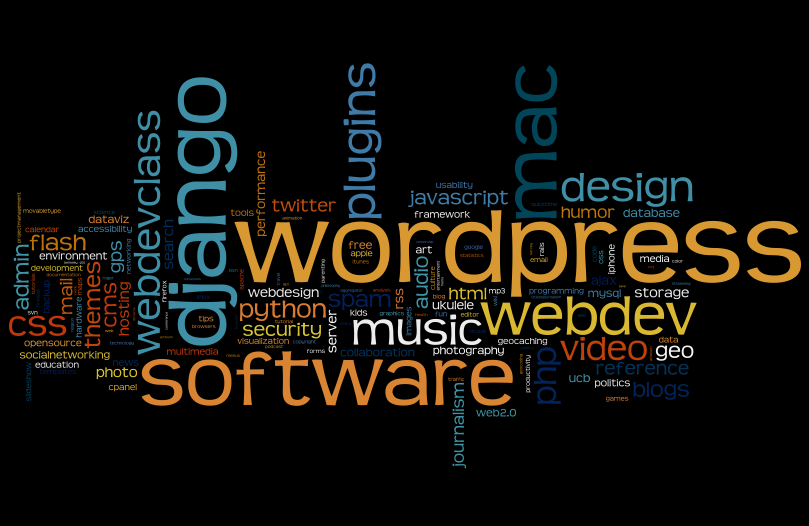
wordle.net not only lets you generate tag clouds out of any chunk of text (which can be great for doing things like figuring out which keywords a politician emphasizes the most in a speech), it can also scan your delicious bookmarks to give you a weighted view of the kinds of things you keep track of. Kind of a zeitgeist snapshot of the inside of your head. It appears that I bookmark work-related/tech stuff almost exclusively. I do have a lot of non-tech bookmarks in delicious as well, but they’re drowned out in the frequency ranking by webdev stuff.

NuForce uDAC

A few weeks ago, during a spell of unusually dry winter weather, I went to unplug a pair of Grado SR-80 headphones from my iMac. A spark of static electricity leapt from my fingers, I heard a brief crackling sound, and then… [silence]. From that moment forward, the headphone/speaker jack on the back of the Mac has refused to work, and only “Internal Speakers” showed up in the System Preferences Sound panel. My trusty work Mac had gone mute.

My only options were either to send the Mac in for repair or switch to USB audio output. I couldn’t afford to be without the Mac, and I was interested in hearing what kind of audio upgrade I’d get by bypassing the Mac’s internal Digital Audio Converter (DAC), so I hit up an audiophile friend for recommendations. Hit the jackpot when he suggested the NuForce μDAC (aka microDAC) – a handsome $99 outboard DAC smaller than a pack of smokes.
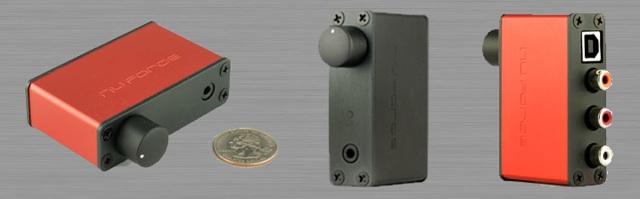
The unit arrived a few days later, and turned out to be even smaller than expected (around 3″x1″). The two-tone rust and flat-black anodized aluminum casing looked distinguished, and well-crafted; NuForce really put some effort into the aesthetics on this one. The design is simple, with no unnecessary controls. Just a volume knob and a headphone output jack, nothing more.

I was blown away from the moment I plugged it in and enabled it in the Sound prefs Output panel. Digital audio has never sounded better on a computer I’ve owned. But since the original analog jack was fried, I had no way to directly compare the quality of the Mac’s native DAC with the new outboard. Today I sat down at someone else’s work Mac and did some A/B testing.

For the test, I chose two recordings:

  • Sonny Rollins: “I’m an Old Cowhand” (from Way Out West)
  • Beatles: “Because” (from Abbey Road 2009 Stereo Remaster)

(I chose these two because A) I love them and B) I had them on hand at 256kbps AAC, for best possible resolution).

Note: I appreciate great-sounding audio, but I’m far from a hardcore audiophile. For a balls-out audio tweak’s perspective on the μDAC, see HeadphoneAddict’s review at head-fi.org.

Just a few minutes into Cowhand, I noticed something I’d never heard before: The sound of the cork linings of the valves of Rollins’ saxophone tapping away as he played. It was subtle, but it had been there in the recording all along – I had just never noticed it. And that’s exactly the point – the differences are subtle, and you may not notice all of them unless you’re listening for them, but they’re present. And that subtlety adds up to an overall experience that’s simply more realistic, more nuanced than what you get with the cheaper DAC built into consumer PCs. It’s all about presence.

Likewise, I found the harmonies in Because fuller, richer, more bodied than they sounded through the Mac’s native DAC. The French horns far more alive and breathy, the harpsichord more twangy. Virtually everything about these two tracks sounded more engaging.

Another thing I noticed: Usually, near the end of a long day writing code, I feel the need to take the headphones off and rest my ears. I didn’t have that sensation today. I can’t say for sure, but I suspect that more natural sound is less fatiguing to the ears (and the brain’s processor).

One caveat: Because there’s no longer an analog sound channel for the computer to manipulate, you’ll lose the ability to control volume or to mute from the Mac’s keyboard. Apparently this is not true of all DACs – the driver for m-audio boxes does allow volume and mute control from the Mac keyboard, so the issue must rest in the generic Mac USB audio driver (the NuForce unit doesn’t come with an installable driver – it’s plug-and-play). In any case, the keboard habit has been ingrained for so many years I don’t even think about it, so retraining myself to adjust audio from the μDAC’s volume knob took some getting used to. However, you can still use the volume control in iTunes itself, and it may be possible to re-map the keyboard’s audio control keys to tweak iTunes’ internal volume directly.

It’s no secret that you can get better sound quality out of almost any computer by routing around the built-in audio chipset. There’s just no way Apple (or Dell, or anyone else) is going to spend more than a few dollars on high-end audio circuitry when most people are perfectly happy with 128kbps MP3s played through cheap-o speakers, and every penny counts in manufacturing bottom lines. But using an outboard DAC for signal conversion can be an expensive proposition, not to mention involving bulky, inelegant, desk-cluttering plastic boxes. The NuForce μDAC gives you high-end computer audio that’s both affordable and elegant.

Another benefit: If you’ve been considering using a dedicated digital audio file player like an AudioRequest connected to the home stereo, you’ll end up having to migrate and store another copy of your audio library, not to mention add more cabling and componentry to your entertainment center. With something like the NuForce μDAC, you can leave everything on your main computer and just route high-fidelity audio to the stereo.

In any case, the NuForce μDAC is one of the best c-notes I’ve dropped on audio gear over the years. Recommended even if you haven’t fried your analog port.

Update: This article has been republished at Unclutter.com.

(I Don’t Care About) Facebook and Privacy

I’m puzzling over the recent brouhaha regarding Facebook’s changes to their privacy policy. To be clear: I’m not puzzling over the changes (though they are confusing to the user who just wants to use the service instead of thinking about its internal minutia) – I’m puzzling over the concern about them.

computer-privacy.jpg Blogs are 100% public. Twitter is 100% public. Posting on newsgroups and forums is 100% public. The web in general is a public space. I’m wondering WHY there are such dramatically different expectations on Facebook than everywhere else. Fine-grained control over exactly who gets to see exactly what? All of this comes down to a single problem: Millions of people apparently want to have a web presence and yet be private at the same time. Everywhere else online, it’s one or the other.

For me, it’s simple: If what you have to say shouldn’t be said to the whole world, then don’t say it online. In other words, the basic assumption is wrong to begin with. Facebook is trying to give you the sense that you can post online and control your privacy at the same time. It doesn’t work.

Actually, this problem isn’t limited to the web. When you walk down the street, you’re on public display. You don’t pick your nose in public because… well, you just don’t. You don’t need to be told that that’s something you do in private. If you have something private to say to someone, you whisper in their ear, or you call them. Or you email them. Don’t post it where others can see it.

The idea that I should be able to play online but not have to worry that my thoughts are completely public just seems… unrealistic. How many stories have you read about people being fired or worse over comments they’ve made on Facebook? Did their privacy settings protect them? No – things get out. The problem is not Facebook’s new privacy settings, but an epidemic of oversharing. It’s a problem that should be solved the same way we solve it in the real world – by being discrete – not by adding more dials and levers to our interactions.

fbprivacy.gif

Then there’s the question of reach. In general, people want to be heard. They pay close attention to the number of Facebook Friends or Twitter followers they currently have. Bloggers watch their traffic logs obsessively. Why? Because they want their thoughts to be heard as widely as possible. Guess what gives your thoughts the widest possible reach? Completely open platforms with no concept of privacy, like Twitter, blogs, and forums. In those spaces, it’s up to the user not to broadcast things they don’t want the whole world to see.

I’m personally glad that Facebook is gradually nudging users to share more content publicly, putting the brakes on this expectation that people can post online but not be public. When was the last time a Facebook post showed up in your Google search results? OK granted, I wouldn’t want most Facebook posts polluting my search results (there’s a whole lot of noise out there), but there’s also a lot of great content locked away behind the “privacy” firewall that really should be part of the public web — which is built on concepts of openness and transparency.

The fact that only people who “friend” me can see my content on Facebook is an annoyance to me, not a feature I cherish and wring my hands over. My dream “privacy” preference for Facebook would be a simple checkbox option reading “I acknowledge that I’m writing stuff on the web. Treat my content as such.”

Update 01/04: In an interview in front of a live audience, Facebook founder Mark Zuckerberg says if he were starting all over again, he’d make everyone’s information public. Because that is the “social norm.”

iTunes Remote Control

bragg.jpg Update, April 2016: Since iTunes 12 and Apple Music, I now store my entire collection in the cloud and am able to access/control it from anywhere, easily, and to redirect the output to any AirPlay device. So the notes below are no longer relevant.

Scenario: Music collection on an iMac in the office on one end of the house, pumping music over Airport Express to stereo in the living room on the other. Need to be able to remotely navigate collection and control playback from a laptop in the living room.

Seemingly perfect solution: iTunes Remote app for iPhone, connecting to the office Mac via wi-fi. Close, but not quite. At first, iTunes Remote app seems like the perfect remote control, complete with album covers. But a real remote you can pick up and operate on a moment’s notice, no strings attached. The iTunes Remote app, on the other hand, takes around 10 seconds to re-connect to the remote library every time you want to use it. You wouldn’t accept that kind of delay from any other remote control, so iTunes Remote gets annoying fast.

Alternative 1: Enable iTunes Sharing on the office Mac, then launch a copy of iTunes on the living room laptop and access the shared library. Configure iTunes to send music from the laptop directly to the AEX. Problem solved? Not quite. I rely heavily on the ability to rate tracks as they roll through. 1 or 2 stars for the tracks I can live without, then periodically cull duds from the collection based on ratings. Tracks with 4 or 5 stars form the basis for my best playlists. Unfortunately, when connecting to a remote library in this way, you have read-only access, and no way to rate tracks on the remote box. Bzzzzzt, deal-breaker.

Remote_iTunes_Logo_1.jpg Alternative 2: Third-party software. There are a few shareware packages available in this niche, but the only one I found that worked reliably was Jonathan Beebe’s open source Remote iTunes. The interface is a stripped down clone of iTunes itself, but its remoting ability includes something iTunes does not – the ability to authenticate as an admin user. Enter the IP of the office Mac, a username and pass, and give it a few seconds to pull across the music library index. Once connected, it stays connected, and you get the ability to rate tunes on the remote system. It’s not perfect, but close enough for jazz.

I’d love for iTunes itself to grow this ability so I’d have access to all iTunes features. Alternatively, I’d kill (not literally) for a desktop version of the iPhone Remote app. But Remote iTunes gets the job done with less pain than anything else I’ve tried.